Problem solved with the tchat bot support. First time a tchat bot saved my day.
"chmod -R 755 usually will not resolve this because macOS privacy controls can block Parallels Desktop even when your account owns the VM files.
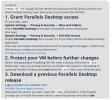
Grant Parallels Desktop access
On your Mac, open:
System Settings → Privacy & Security → Files and Folders
Select Parallels Desktop and enable all available access checkboxes.
Also open:
System Settings → Privacy & Security → Full Disk Access
Enable Parallels Desktop there as well. If it is not listed, add the Parallels Desktop application.
Then quit and reopen Parallels Desktop and try opening the VM again. Confirm that VM sharing is configured as described here:"
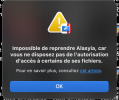
The Full disk access was enabled in the files and folders but wasn't in "Full Disk Access" option. I suppose macOs removed it during the uninstall/install process of Parallels Desktop.