Hello.
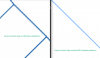
I'm comparing the display of lines on two different platforms:
#1. Revit on Windows x86.
#2. Revit on Windows 11 Arm.
It is very difficult to work on a monitor on which the drawing is displayed with very thin lines.
Is it possible to make it so that platform #2 has the same line smoothing as platform #1?
Does the situation depend on Windows 11 or MacOS?
Thank you.
I'm comparing the display of lines on two different platforms:
#1. Revit on Windows x86.
#2. Revit on Windows 11 Arm.
It is very difficult to work on a monitor on which the drawing is displayed with very thin lines.
Is it possible to make it so that platform #2 has the same line smoothing as platform #1?
Does the situation depend on Windows 11 or MacOS?
Thank you.