
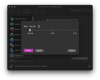
I migrated my Boot Camp Windows 10 install to a Parallels VM. The Boot Camp was using roughly 140GB of space. The VM, though, is now showing that there is 790GB of Unallocated Space before the partition that contains my C Drive. That means I cannot expand my C Drive to add more space. When I look in the Parallels configuration for that Hard Disk and check Advanced, the size of the drive is a minimum of 932 GB.
How can I either move the C drive so there are 0 bytes before it or remove that Unallocated Space completely?
I have tried using NIUBI partition editor, but after it completes, when Windows 10 boots, and I look at Disk Management, the disk still showing the same way.

How can I either move the C drive so there are 0 bytes before it or remove that Unallocated Space completely?
I have tried using NIUBI partition editor, but after it completes, when Windows 10 boots, and I look at Disk Management, the disk still showing the same way.