Lonnie J Thibodeaux
Bit poster
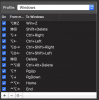
I have attempted to set up shortcut key combinations for Page Up, Page Down, Home, End in a Win 10 VM.
Key combinations such as shown in the following screenshot.
I have also tried Option + Up Arrow for PgUp, and Option + Down Arrow for PgDown).
None of the last for combinations listed work.
Verified the PgUp & PgDown scrolling of Web Pages or Word Documents works on native Windows machine, just cannot make it work in Parallels.
Any assistance is greatly appreciated
LThibx
Key combinations such as shown in the following screenshot.
I have also tried Option + Up Arrow for PgUp, and Option + Down Arrow for PgDown).
None of the last for combinations listed work.
Verified the PgUp & PgDown scrolling of Web Pages or Word Documents works on native Windows machine, just cannot make it work in Parallels.
Any assistance is greatly appreciated
LThibx