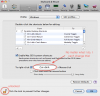
In Parallels Desktop version 5, there is a section in the bottom half of the Keyboard & Mouse Preference pane that is labelled "To right-click:" Next to this there is a checkbox, what looks to be a writeable text field, and the words "+ Mouse click."
I am unable to change the value in this seemingly writeable text field. I do not understand why it looks like one can change it. No matter what buttons I press, or if I try to delete the text, nothing happens.
If the text cannot be changed, the field should be grayed out, to indicate that it is read-only. But if it is meant to be modifiable, I would like to know how to do it.
See attachment if you would like more clarity.
Thanks in advance.
-A.
I am unable to change the value in this seemingly writeable text field. I do not understand why it looks like one can change it. No matter what buttons I press, or if I try to delete the text, nothing happens.
If the text cannot be changed, the field should be grayed out, to indicate that it is read-only. But if it is meant to be modifiable, I would like to know how to do it.
See attachment if you would like more clarity.
Thanks in advance.
-A.