Hi,
I recently got a MacBook Pro M2 Max. I installed Parallels and Windows 11 on ARM. Before I had a MacBook Pro Intel i9 (2019) and Windows x64.
Nearly everything works fine, but one thing is really driving me nuts. The keyboard mapping isn't as before and as I expected. With my old MacBook, I used the left option key to input characters like @, {}, [] and so on as in macOS. This doesn't work anymore now. After some hours I found out that the right option key does what I wanted. I like to have it switched so using the left option key for this. Is this a bug or did I've done anything that changes the default behavior? How can I fix that?
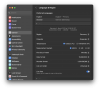
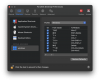
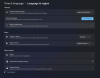
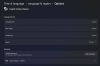
I'll attach some screenshots of my macOS and Windows settings. If you need any further information feel free to contact me Thanks for your help!
I recently got a MacBook Pro M2 Max. I installed Parallels and Windows 11 on ARM. Before I had a MacBook Pro Intel i9 (2019) and Windows x64.
Nearly everything works fine, but one thing is really driving me nuts. The keyboard mapping isn't as before and as I expected. With my old MacBook, I used the left option key to input characters like @, {}, [] and so on as in macOS. This doesn't work anymore now. After some hours I found out that the right option key does what I wanted. I like to have it switched so using the left option key for this. Is this a bug or did I've done anything that changes the default behavior? How can I fix that?
I'll attach some screenshots of my macOS and Windows settings. If you need any further information feel free to contact me
Thanks for your help!