Kali Linux 2023.3 2023.1 - Parallels Tools can not be installed

VornameAN

Bit poster
Hey Parallels User!

I have been wondering, if someone got the latest Kali Linux (2023.3) running with Parallels and Parallels Tools to enable functions such as clipboard and display resolutions?

Following image was mounted to CD-ROM:
prl-tools-lin.iso

I have downloaded the following versions:
- Kali Linux 2023.3 No Linux headers found for the kernel
- Kali Linux 2023.1 No Linux headers found for the kernel
- Kali Linux 2022.2

Since I couldnt find any repo that contains linux-headers-$(uname -r) for the installed kernel, I did a full dist-upgrade on 2023.3 Kali Linux, installed the headers from the official repo.
Still receiving the error attached below.

I have mounted the Parallels Tools as CD and executed the following command:
Code:
sudo mount -oro,exec /dev/cdrom /media/cdrom
sudo /media/cdrom/install
As it seems like, it cant install Parallels Tools due to the makefile not existing when executing the make command manually.
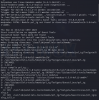
Bildschirm­foto 2023-09-21 um 16.15.58.png
 
Hello.

As Linux kernels are being continuously released, and the latest kernel release having occurred after the latest Parallels Tools release, you may run into compatibility issues, as they are yet to be implemented. We are, however, working on this and have shared the feedback for this with our Development Team.
In general, there should be no issues with the stable release build of the Linux OS, which in case of Kali, was on kernel 6.3 in August, for which Tools function.

Although I would like to point out, that there seems to be a workaround, albeit not in any way of an official capacity, discussed in the following thread: https://forum.parallels.com/threads/kali-linux-upgrade-boot-kernel-panic.361436/
 
Same here... I cannot Use Kali Linux at all (tried 2022.1,2022.2, 2023.1). I tried all possible ways even downloading a ready virtual box image from kali, converting it to parallels 19 but yet the same errors. Linux headers cannot be found to be downloaded. I have to use other security focused OS until this is fixed, but very frustrating tbh
 
Hello all, yesterday I updated my Kali and run into the kernel panic, since then I have tried several reinstallations of Kali on my M2 for 2023.3 without any success
I can install and use the Kali-ready 2023.2 VM predefined on Parallels repos but cannot upgrade it.
Cammon Parallels what is this BS?
 
As you can imagine, Linux support is somewhat complicated. It will probably take them a while to support the daily updates that Kali Linux seems to perform. Developing drivers for Linux is not an easy task. Of course there are open virtualization guest software built into the Linux distributions for a while. Maybe supporting that would make issues like this go away.
 
As a workaround, what you could do is on a fresh 2023.3 install, before you do any update/uprade, switch to a more stable branch with an older kernel:
Code:
kali@kali:~$ echo "deb http://http.kali.org/kali kali-last-snapshot main contrib non-free non-free-firmware" | sudo tee /etc/apt/sources.list

after that, do your apt update && apt upgrade and after that install the parellels tools.
The name of the branch "last-snapshot" can be a misleading, but it means you opt out from the rolling releases and therefore your system is a bit more stable:
according to their docs

> kali-rolling - default & frequently updated
> kali-last-snapshot - point release so more "stable" & the "safest"
 
As a workaround, what you could do is on a fresh 2023.3 install, before you do any update/uprade, switch to a more stable branch with an older kernel:
Code:
kali@kali:~$ echo "deb http://http.kali.org/kali kali-last-snapshot main contrib non-free non-free-firmware" | sudo tee /etc/apt/sources.list

after that, do your apt update && apt upgrade and after that install the parellels tools.
The name of the branch "last-snapshot" can be a misleading, but it means you opt out from the rolling releases and therefore your system is a bit more stable:
according to their docs

> kali-rolling - default & frequently updated
> kali-last-snapshot - point release so more "stable" & the "safest"
Thank you so much for this fix! I have been so frustrated by this.
 
After spending time and money on acquiring Parallels Desktop, I expected a seamless experience in creating and managing virtual machines. However, I have been forced to seek a workaround to get my VMs to function adequately. This is simply unacceptable.

I believe it's the responsibility of companies like Parallels to ensure that their customers have a satisfactory experience with their paid software. We shouldn't have to search for alternative solutions to make a product we've already paid for work.
 
Hello!
We've added support for Linux kernel 6.5 in Parallels Desktop 19.1.0 that should be released within a few hours. Please install the latest version of Parallels Desktop and check if the issue is addressed.
 
I am using an intel chip MacBook Pro. After I installed the latest version of Parallel desktop, the same parallel tool issue said as above still remains. By the way, there is no Kali vm provided from Parallel desktop, I need to install Kali myself then put it into Parallel desktop, which would be better if I can straight up install it from the desktop, so that I might not encountered this problem.

The workaround DanieleD5 provided worked, thank you very much, however sometimes the vm will automatically boot into busybox initramfs without further error displayed.
 
I can't update mine and would appreciate help. Contacted Parallels and got a guy who have no knowledge and asked me if I had a backup. This is what I'm used to these days with Parallels and I've been using it for a decade. Wasn't always like this.
 
I can't update mine and would appreciate help. Contacted Parallels and got a guy who have no knowledge and asked me if I had a backup. This is what I'm used to these days with Parallels and I've been using it for a decade. Wasn't always like this.

Hello gspot,

Kindly provide us with more information on this issue e.g. details or screenshots of errors you received during your attempted update.
Additionally, please collect a technical report while the issue is being reproduced (click the Parallels icon > Help > Send technical data > check "Attach screenshots..." > press Send Report) and send the report's 9-digit ID in reply to this post.
 
Back
Top