
Hello, I am a newcomer to apple MacBook and this Paralles Desktop forum. I have installed Parallels Desktop for Mac App Store Edition 1.10.3 (23904) on my new MacBook Air with M4 chip and macOS Sequoia 15.5. I have also finished installing Windows 11 and licensed it. Now I have several issues.
1. With first time reboot I have a black window. Later I found a way to close that black window and it never shows again. I do not know if it is a symptom of Parallels Desktop.
2. The settings of sharing is not as what most online guidelines say. After booting the computer, the Windows 11 is shown automatically. I could activate "Windows 11" Configuration window by two ways. One is with Parallels Desktop context menu and select "Control Center". Another is with Parallels Desktop top menu "Window"-"Control Center". I am not sure if these are just right manipulation for the newest version of Parallels Desktop.
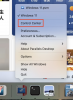
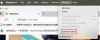
3. Control Center window shows like below.
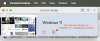
"Windows 11" Configuration window shows like below.
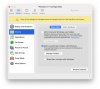
Inside "Windows 11" Configuration window, select Sharing and select tab "Share Mac". When I check "Mirror Mac and Windows user folder", below window will pop out.
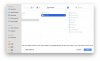
Within this window, I cannot confirm with "Allow" button. I noticed there is a tip "You must allow access to your home folder for Parallels Desktop to save your choice. You only need to do this once." But I think "zhuzhu" is just my home folder.
When I check "Share Mac volumes with Windows", below window will pop out.
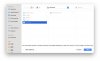
Within this window, I cannot confirm with "Allow" button too. I noticed there is a tip "You must allow access to macOS volumes for Parallels Desktop to save your choice. You only need to do this once. " Within the window, the "Macintosh HD" is in gray and I cannot select it at all.
My intention here is to use windows application from my USB disk. So I currently do not know how to proceed. I cannot access the windows application installation file on the USB disk from virtual machine. Please give me some hints on how I should proceed.
1. With first time reboot I have a black window. Later I found a way to close that black window and it never shows again. I do not know if it is a symptom of Parallels Desktop.
2. The settings of sharing is not as what most online guidelines say. After booting the computer, the Windows 11 is shown automatically. I could activate "Windows 11" Configuration window by two ways. One is with Parallels Desktop context menu and select "Control Center". Another is with Parallels Desktop top menu "Window"-"Control Center". I am not sure if these are just right manipulation for the newest version of Parallels Desktop.
3. Control Center window shows like below.
"Windows 11" Configuration window shows like below.
Inside "Windows 11" Configuration window, select Sharing and select tab "Share Mac". When I check "Mirror Mac and Windows user folder", below window will pop out.
Within this window, I cannot confirm with "Allow" button. I noticed there is a tip "You must allow access to your home folder for Parallels Desktop to save your choice. You only need to do this once." But I think "zhuzhu" is just my home folder.
When I check "Share Mac volumes with Windows", below window will pop out.
Within this window, I cannot confirm with "Allow" button too. I noticed there is a tip "You must allow access to macOS volumes for Parallels Desktop to save your choice. You only need to do this once. " Within the window, the "Macintosh HD" is in gray and I cannot select it at all.
My intention here is to use windows application from my USB disk. So I currently do not know how to proceed. I cannot access the windows application installation file on the USB disk from virtual machine. Please give me some hints on how I should proceed.