
Install the app
How to install the app on iOS
Follow along with the video below to see how to install our site as a web app on your home screen.
Note: This feature may not be available in some browsers.
You are using an out of date browser. It may not display this or other websites correctly.
You should upgrade or use an alternative browser.
You should upgrade or use an alternative browser.
Is version 19 ok?
- Thread starter BogdanC
- Start date

Hello,Parallels pesters me every day to upgrade but, honestly, I am afraid to update. The version that I have 18 is stable, why should I upgrade?
If you installed 19, what is your experience so far? I am running windows 10 on a intel 2019 mac.
thanks
Parallels Desktop 19 offers you with some new features and options.
Kindly refer to this article for Parallels Desktop 19 updates summary: https://kb.parallels.com/en/129860
Thank you.
KristianS1
Member
Mostly, I've only hit one annoying bug with the Dock still appearing in full-screen mode. Your use-cases might vary from mine though.

Mikhail Ushakov
Problem solver
Thank you. We know about this issue and are actively working to address it as soon as possible.Mostly, I've only hit one annoying bug with the Dock still appearing in full-screen mode. Your use-cases might vary from mine though.
Thank you. I have 2 monitors and I use windows 10 in full screen mode. Are you saying the Dock is visible taking up space from the windows screen?Mostly, I've only hit one annoying bug with the Dock still appearing in full-screen mode. Your use-cases might vary from mine though.
Could you please post here the link to this issue?Thank you. We know about this issue and are actively working to address it as soon as possible.
Thanks

rumours
Bit poster
Mac Dock disappears while Windows 11 is in Full Screen with multiple monitors ("Automatically hide and show the Dock" is disabled on macOS).Could you please post here the link to this issue?
Thanks
Mikhail Ushakov
Problem solver
Hello!
The issue has been addressed in Parallels Desktop 19.1.0 that should be released within a few hours.
The issue has been addressed in Parallels Desktop 19.1.0 that should be released within a few hours.
No, it is not OK. It seems to have stopped communicating with Windows. Mouse clicks and menu commands (such as ctrl-alt-del) get no response from Windows. Also, icons have disappeared from dock and desktop. This must be a bad issue since I put in a ticket two days ago and have received no response.
Mikhail Ushakov
Problem solver
hi @SteveD17 ,No, it is not OK. It seems to have stopped communicating with Windows. Mouse clicks and menu commands (such as ctrl-alt-del) get no response from Windows. Also, icons have disappeared from dock and desktop. This must be a bad issue since I put in a ticket two days ago and have received no response.
It seems it's just Parallels Tools that haven't been installed properly. Kindly try reinstalling them by clicking Actions > Reinstall Parallels Tools.
Once they're installed, restart Windows again.
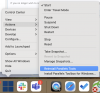
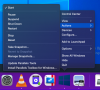
Mikhail Ushakov
Problem solver
Try to reinstall Parallels Tools as outlined at https://kb.parallels.com/4841 then, please.Thanks for the response, but it does not seem to match what I see. I do not see "reinstall Parallels Tools". I tried "Update Parallels Tools" but that does not seem to do anything.
View attachment 21505