MatthewK14
Bit poster
I have color vision deficiency, meaning I can't see some types of red, so I don't know if these menus are visible to others, but they are not visible to me.
On non-VM macOS(on MacBooks, Mac Minis, iMacs, et cetera), in :System Settings...:Accessibility isplay there are two settings I use to make it easier for me to see borders between different items on the screen(window borders, fonts, buttons, et cetera).These two settings are:
I am using Parallels 18.3.0, with the update that my system just got today(although this was also an issue on the version of Parallels immediately before this update).
I use macOS in "light mode", because as someone who has difficulty with colors, "dark mode" makes it muchharder to see things on the screen.
The menus in the left side of the menu bar are only visible to me if I use dark mode with both of those settings disabled, but I would prefer to use light mode with both of those settings enabled.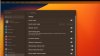
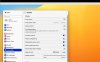

On non-VM macOS(on MacBooks, Mac Minis, iMacs, et cetera), in :System Settings...:Accessibility
isplay there are two settings I use to make it easier for me to see borders between different items on the screen(window borders, fonts, buttons, et cetera).These two settings are:- Increase contrast
- Reduce transparency
I am using Parallels 18.3.0, with the update that my system just got today(although this was also an issue on the version of Parallels immediately before this update).
I use macOS in "light mode", because as someone who has difficulty with colors, "dark mode" makes it muchharder to see things on the screen.
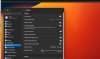
The menus in the left side of the menu bar are only visible to me if I use dark mode with both of those settings disabled, but I would prefer to use light mode with both of those settings enabled.