johnrellis
Member
I tried to install a Mac OS 15.0 guest (release, not beta) on a Mac OS 14.6.1 host (Apple M2 Max, Parallels Desktop Pro 20.0.1), following these instructions, but they don't work:
Install macOS virtual machine on a Mac with Apple silicon
I downloaded "UniversalMac_15.0_24A335_Restore.ipsw" from here:
https://developer.apple.com/download/
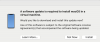
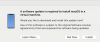
Following the instructions in the article, I opened that .ipsw in Parallels Desktop. It created a virtual machine in Desktop, but when I tried to run it I got:
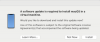
Clicking Install produces this error:
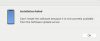
Restarting the host Mac didn't help.
I was able to install a Mac OS 15 guest by doing Parallels Desktop > New > Download Macos, which installed Mac OS 14.6.1, and then doing a Software Update in the 14.6.1 guest. But I had been hoping to avoid the extra download and install of Mac OS.
Install macOS virtual machine on a Mac with Apple silicon
I downloaded "UniversalMac_15.0_24A335_Restore.ipsw" from here:
https://developer.apple.com/download/
Following the instructions in the article, I opened that .ipsw in Parallels Desktop. It created a virtual machine in Desktop, but when I tried to run it I got:
Clicking Install produces this error:
Restarting the host Mac didn't help.
I was able to install a Mac OS 15 guest by doing Parallels Desktop > New > Download Macos, which installed Mac OS 14.6.1, and then doing a Software Update in the 14.6.1 guest. But I had been hoping to avoid the extra download and install of Mac OS.