Hello Folks.
Could somebody please point me in the right direction for how I actually get past the 'Allow' phase in System Preferences on my Mac?
This morning, after quite some time of not using this program for various reasons, I attempted to install version 12 of P. Desktop, which, on failing with the exact problem described above, politely informed me that there were issues and I'd be much better off upgrading to version 13. Following the obviously good advice, I duly upgraded.
However, the exact same problem has appeared and I cannot get past the 'Allow' phase, as the button has no effect whatsoever.
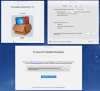
I've added a screenshot of where I can actually get to in the process.
I'd be most grateful if somebody could point me in the right direction. If there is no easy way, does somebody have a detailed description of how to wipe the Mac of all traces of 12 and 13 so I can start from a clean slate?
Any help and advice is greatly appreciated.
Many thanks in advance and kind regards.
Stan
Could somebody please point me in the right direction for how I actually get past the 'Allow' phase in System Preferences on my Mac?
This morning, after quite some time of not using this program for various reasons, I attempted to install version 12 of P. Desktop, which, on failing with the exact problem described above, politely informed me that there were issues and I'd be much better off upgrading to version 13. Following the obviously good advice, I duly upgraded.
However, the exact same problem has appeared and I cannot get past the 'Allow' phase, as the button has no effect whatsoever.
I've added a screenshot of where I can actually get to in the process.
I'd be most grateful if somebody could point me in the right direction. If there is no easy way, does somebody have a detailed description of how to wipe the Mac of all traces of 12 and 13 so I can start from a clean slate?
Any help and advice is greatly appreciated.
Many thanks in advance and kind regards.
Stan