
Install the app
How to install the app on iOS
Follow along with the video below to see how to install our site as a web app on your home screen.
Note: This feature may not be available in some browsers.
You are using an out of date browser. It may not display this or other websites correctly.
You should upgrade or use an alternative browser.
You should upgrade or use an alternative browser.
Install Cisco Anyconnect ARM64 version on Windows ARM VM
- Thread starter Sikeer
- Start date
Best answer
Hi all. This is now fixed using the 4.10.08029 Any Connect version.
Download the anyconnect-win-arm64-4.10.08029-predeploy-k9.zip
Install the "Core" version.
https://cios.dhitechnical.com/Cisco...ct 4.x/anyconnect-all-packages-4.10.08029-k9/
Download the anyconnect-win-arm64-4.10.08029-predeploy-k9.zip
Install the "Core" version.
https://cios.dhitechnical.com/Cisco...ct 4.x/anyconnect-all-packages-4.10.08029-k9/
me too. I switched it to x86 version, it can be installed successfully, but when I connected to VPN gateway, it report error.Same here, version 4.9.06037
P
Parallels User
ThorstenM3
Bit poster
Hi Roman,
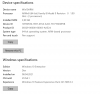
you are using OS build 21354.1, while the latest which I get through updating is 21343.1. My edition is called Windows 10 pro insider preview while you have windows 10 Pro only. Just saw that there is an update and I will install it as well.
Have you installed the Anyconnect client for Windows 10 or the ARM version of it?
Working since days on it and be very happy that it seems to work for you. So far I got a break when I tried to install the Anyconnect ARM version and when I install the Windows 10 version it seems to work but it is not installing the network adapter. The driver can not be installed.
Have now really hope that it can be fixed the way you have done it.
you are using OS build 21354.1, while the latest which I get through updating is 21343.1. My edition is called Windows 10 pro insider preview while you have windows 10 Pro only. Just saw that there is an update and I will install it as well.
Have you installed the Anyconnect client for Windows 10 or the ARM version of it?
Working since days on it and be very happy that it seems to work for you. So far I got a break when I tried to install the Anyconnect ARM version and when I install the Windows 10 version it seems to work but it is not installing the network adapter. The driver can not be installed.
Have now really hope that it can be fixed the way you have done it.
P
Parallels User
i use "anyconnect-win-arm64-4.9.06037-core-vpn-predeploy-k9.msi" from https://t.me/s/cisco_collection (after download check md5 https://software.cisco.com/download/home/286281283/type/282364313/release/4.9.06037 )Have you installed the Anyconnect client for Windows 10 or the ARM version of it?
ThorstenM3
Bit poster
Have tried it now with OS build 21354.1
Anyconnect latest version for Windows 10 - an official package - (not the ARM version, because it still fails to install)
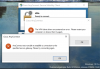
The Windows 10 version can be installed but it fails to install the network adapter. The driver can not be installed even when the inf file is available in the CISCO subdirectory. Also a manual installation is not possible.
As a result I get the below.
Which version of the VPN (ARM or regular Windows 10) have you installed and how have you managed it?
Anyconnect latest version for Windows 10 - an official package - (not the ARM version, because it still fails to install)
The Windows 10 version can be installed but it fails to install the network adapter. The driver can not be installed even when the inf file is available in the CISCO subdirectory. Also a manual installation is not possible.
As a result I get the below.
Which version of the VPN (ARM or regular Windows 10) have you installed and how have you managed it?
P
Parallels User
use arm version. for install use 21286 official buildnot the ARM version, because it still fails to install
Hi Roman,i use "anyconnect-win-arm64-4.9.06037-core-vpn-predeploy-k9.msi" from https://t.me/s/cisco_collection (after download check md5 https://software.cisco.com/download/home/286281283/type/282364313/release/4.9.06037 )
how did you get around installation error saying that you cannot install on 64-bit Windows version? Did you edit msi package with Orca?
Thank you.
P
Parallels User
1. install 21286 build vxhd from microsoft
2. install arm-version cisco anyconnect
3. update windows to last version (if you need)

ThorstenM3
Bit poster
Hey Roman,
this was now so simple and so useful. A downgrade of Windows and CISCO ARM can be installed. Thanks a lot! Everything works now.
If I could send you some good german beer I would do so ;-)
this was now so simple and so useful. A downgrade of Windows and CISCO ARM can be installed. Thanks a lot! Everything works now.
If I could send you some good german beer I would do so ;-)
For me it doesn't work with the ARM64 Anyconnect.
I can install the msi-file if I first adjust the MSI-file with Orca.
But after installation it doesn't work, it tries to connect but say "Attempting to repair VPN adapter" I get the feeling that I'm missing the network adapter that normally are installed under network adapters.
I can install the msi-file if I first adjust the MSI-file with Orca.
But after installation it doesn't work, it tries to connect but say "Attempting to repair VPN adapter" I get the feeling that I'm missing the network adapter that normally are installed under network adapters.
I made a transform for the MSI and replaced every instance of "NOT VersionNT64" with "VersionNT64" and now it installs and appears to work correctly. Originally I just removed the launch condition that was blocking the install. It appeared to install correctly but would fail to connect. So I took a guess that the newer builds of Windows ARM are reporting VersionNT64 as true but older builds were not and there are various components that a "NOT VersionNT64" condition on them that don't get installed if you only remove the launch condition. There were also various conditions built on VersionNT64 being TRUE, and I considered changing them to NOT VersionNT64... but held off and so far it seems okay. I don't really have the inclination to dig through the install and figure out exactly what every component condition does without better tools than Orca. Ultimately this is something Cisco will have to fix in their installer but for now a search and replace of "NOT VersionNT64" with "VersionNT64" in Orca seems to work.