iMac retina 5k excel huge display issues

benjaminfrombe

Bit poster
Hi,

I have an imac retina 5k (the AMD Radeon R9 M295X 4096 MB) version.

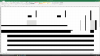
I get black bars as shown in the screenshot when scrolling through a spreadsheet. I tried all different video card memory settings, tried directx10 and 9, disabled vertical sync ... but I can't solve it.

I'm at the latest version of PD10 and have the issue on both win 8.1 and win 10, office 2013 and 2016 preview, I also reinstalled my entire yosemite to be sure that a previous upgrade was not causing this problem... It's kinda driving me nuts :(

Does anyone have any idea what could cause this an how I could solve this ? Or is this something that needs to be fixed by parallels ?

Thanks for caring !

Benjamin
 

Attachments

  • imac screenshot.png
    imac screenshot.png
    611 KB · Views: 17
too bad, tried reinstall, same problem ... Do you have an imac retina 5k (the AMD Radeon R9 M295X 4096 MB) to try to simulate this problem ?
 
Hello,
I'm experiencing the exact same issues. Was there ever a resolution to this problem?
If it's helpful at all, it only happens when the resolution is set at 5K AND with Excel set to full screen.
Thanks for any help!
Bruce
 
Last edited:
Hi,
I understand that you would like to adjust scaling in Windows virtual machine, fonts are too small or too big or black lines in Windows.
This issue occurred if some Windows applications are not adapted for HiDPi resolutions
First of all let me say that all Windows applications are not designed for Retina displays as Microsoft does not support it at all. With Parallels Desktop it is possible but please consider that this is only our customization through virtual drivers.
So the issue is not with Parallels Desktop, it is how Windows shows an application on the virtualized PC desktop.
The most optimal settings to get proper views are:
1) Mac's system preferences -> Displays. In resolution you need to change it from "Best for Retina" to Scaled (one item left from Best of Retina
2) Parallels Virtual Machine Configuration ( http://kb.parallels.com/en/117287 ) -> Hardware -> Video -> More space or Un-tick Retina support.
3) Set scaling as 100% (default) in Guest OS: - Go to Start menu > Control Panel > Display - Set size of text and icons size as 100% (default) 2. Restart Windows virtual machine.
After these setting it should look fine.
For more information please refer this article http://kb.parallels.com/en/119926
 
Thanks Dishant,
Totally understand that this is a Windows issue.
Either way, thank you very much for your help. Following your steps solved the problem for me.
Thanks again!
Bruce
 
Hi BruceH1,
Glad that the issue was resolved and thanks for letting us know that it helped! Feel free to reach out anytime for any queries.
 
Definitely Parallels don´t support the AMD Radeon video card, I´ve tried several times with different configuration and is not possible to see correctly Autocad files, seems like the only option is BootCamp
 
Back
Top