iCloud Drive missing folders

RonaldF1

Junior Member
since last update to Parallel 13 for Mac, when showing the iCloud Drive "drive" under Windows XP or Windows 10, some folder vanished although they are present on the Mac side.
Remaining are the manually created folders, missing are the system folders created by apple like "numbers", "page", "textedit" etc....
These folders were visible in Parallel 12.
 
done but no change !!

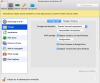
Make sure that the sharing is enabled for the iCloud folder in Windows virtual machine. To enable it, please click on two red lines (On the Mac menu bar) > Configure > Options > Sharing > Share Mac > Enable the iCloud Drive with Windows and see if this helps. Thanks!

Screen%20Shot%202015-07-15%20at%204.37.10%20PM.png
 
Sure it is, see screen capture. As I said, the drive is accessible but not ALL folders are listed. Missing are the Apple folders like "pages", "keynotes" etc... but the folder "applications" is visible.
I sait again everything worked before update to 13.
 

Attachments

  • Capture d’écran 2017-11-01 à 14.47.21.png
    Capture d’écran 2017-11-01 à 14.47.21.png
    254.2 KB · Views: 8
Hi Arun, sorry, I isolated, uninstalled the Tools, re-installed them, and uncheck isolate but no change.
I still do not see some folders of the iCloud drive. I repeat it worked correctly before last Parallel update !
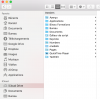
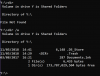
I attach 2 screen shots. One from finder (Mac side) one from explorer (Windows side)Capture d’écran 2017-11-12 à 09.49.40.pngCapture d’écran 2017-11-12 à 09.51.21.png
 
Here is the ID of the problem report 225959893
Hi @RonaldF1, Please shut down the virtual machine and follow the steps suggested below:
1. Go to the Apple menu > System Preferences > iCloud > (enable iCloud Drive) > Options... > check Desktop & Documents Folders option > click Done.
2. Go the virtual machine configuration -> Options -> Sharing -> Share Mac -> Share folders -> Custom Folders -> click "+" sign to add iCloud drive from Mac.
 
Hi Paul,
I did all what you suggest but the result is still the same.
Remember (see post above with screen capture) my iCloud drive is working perfectly in the Mac space. I see all the folders including the Mac created folders like "keynote" etc...

If I go to the windows side and open the file explorer, I see only some folders of the iCloud drive and the Mac created folders are missing.

I tried to remove the check on "share iCloud-google drive-dropbox" and add manually the iCloud drive in the liste of shared drives. Result is exactly the same !

Again: IT WORKED PERFECTLY before the last update of Parallels !!!

So Sorry to have no better news !
 
Hi,
I have the same issue with some iCloud drive folders missing in Windows environment. Exactly as RonaldF1 described in this thread. I followed all instructions but still no positive results. This is really annoying. Its there a solution yet?
 
Hi,
I have the same issue with some iCloud drive folders missing in Windows environment. Exactly as RonaldF1 described in this thread. I followed all instructions but still no positive results. This is really annoying. Its there a solution yet?
Try enabling Show Hidden Files and Folders in Windows Folder options then check.
 
Hi Ajith,
thanks for your fas reply. I tried your suggestion but no positive result neither. Look at the screenshorts
Regards
Stefan
 

Attachments

  • icloud drive on mac.png
    icloud drive on mac.png
    26.9 KB · Views: 2
  • icloud drive on Windows 7.png
    icloud drive on Windows 7.png
    16 KB · Views: 2
  • show hidden files disabled.png
    show hidden files disabled.png
    28.4 KB · Views: 2
  • show hidden files enabled.png
    show hidden files enabled.png
    27.5 KB · Views: 2
Same here I'm afraid. iPhotos seems okay, but just nothing showing for iCloud. I tried all the checks mentioned earlier, isolating/unisolating, reinstalling the tools etc and adding the customer folder - but nothing shows up at all for me. Not a bean. This is really annoying. I know it used to work but something stopped with either a Parallels update, a Windows update or a macOS update - I don't know which though. There isn't anything obvious in any of the logs on either side that seems to offer any clues either. iCloud is fine on the Mac, but not on the Windows VM. :(
 
Update. I noticed I had a Y: drive mapped under the Windows VM to the iCloud Drive - see below. At fist it looks empty, but contains hidden files - upload_2018-5-11_15-7-13.png

It doesn't match the folders in the Mac version of the iCloud Drive though. And if I type the contents of the Documents.lnk file shows above, it looks like this:
upload_2018-5-11_15-9-33.png

The folder on the Mac looks like this though:
upload_2018-5-11_15-12-49.png

So the cloud drive sharing isn't working still.
Thanks, Paul
 

Attachments

  • upload_2018-5-11_15-12-30.png
    upload_2018-5-11_15-12-30.png
    32.8 KB · Views: 1
  • upload_2018-5-11_15-12-49.jpeg
    upload_2018-5-11_15-12-49.jpeg
    68.9 KB · Views: 1
I have the same issue, however I found sort of a work around if you have the seamless settings configured:

Location in Windows VM:
The path is \\Mac\Home\Library\Mobile Documents
The folder names are a bit cryptic but have some abbreviated form of the app that created it...i.e like "COM~apple-notes" or "iCloud-com-Applejacks".

Tested:
I opened, modified and saved files in Windows and they sync'd live across platforms (a markdown editor open on iOS, Mac and Windows at the same time (had to refresh doc on iOS to see change - Mac and Win apps showed the change immediately without even closing the doc).

Manually browsing:

1) Browse to desired icloud folder in OSX Finder,.."right click" (haha) and select "Reveal in Windows" (last option in list - Parallels added option).

2) Windows VM - an Explorer window opens and shows the path contents which you can then shortcut or quick access to.
 
Last edited:
That seems to work for me too, @ROBERTB24 - thanks for the tip. It's not an ideal longer-term solution though. The "Share cloud folders with Windows" feature seems to be broken with some recent updates wither in Windows or MacOS. There was a recent update to Parallels that I thought may have addressed this (version 13.3.1 (43365)), but alas it did not.
 
Back
Top