Hi all!
I'm in a bit of a pickle here, and need urgent assistance. Really hope you guys have some good advice, greatly appreciated!
Setup:
Macbook Pro M1
Running Parallels 18
Windows 11 Insider Preview (only thing that worked three years ago)
The issue:
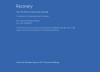
Windows updates kept giving me blue-screen errors after updating, so I paused updates for a while. Unfortunately, this has resulted in the Windows booting in Recovery mode with the following message:
"A component of the operating system has expired
File:\windows\system32\winload.efi
Error code: 0xc0000605"
You'll need to use recovery tools. If you don't have any installation media etc.."
This, as I've learned, can happen if you don't update your Windows build. Now, I've tried to scour the internet for help, and I've found several suggestions, but nothing has brought me past the "blue screen of recovery."
What I've tried:
- Bootable USB-stick. So far, been unable to boot from the USB in Parallels, even if I've changed boot order in Parallels, UEFI etc. Not sure why this doesn't work(?).
- Changed the date of my Mac to 6 months back to see if the Windows BIOS would backtrack as well and appear as "not expired" (Not successful)
- Boot Parallels Mounter to access files without turning on the VM. Can't get the Mounter to work, not sure why.
What I need help with:
All I really need is to access one folder so I can copy and download this to my Mac and my new VM. Don't care about the settings or software, only one folder with a bunch of folders/files.
Qs:
- Is there an easy way to access the files or folders without starting the VM?
- Can I reinstall Windows over my expired version, yet keep the existing files in Parallels?
- Other suggestions?
I'm in a bit of a pickle here, and need urgent assistance. Really hope you guys have some good advice, greatly appreciated!
Setup:
Macbook Pro M1
Running Parallels 18
Windows 11 Insider Preview (only thing that worked three years ago)
The issue:
Windows updates kept giving me blue-screen errors after updating, so I paused updates for a while. Unfortunately, this has resulted in the Windows booting in Recovery mode with the following message:
"A component of the operating system has expired
File:\windows\system32\winload.efi
Error code: 0xc0000605"
You'll need to use recovery tools. If you don't have any installation media etc.."
This, as I've learned, can happen if you don't update your Windows build. Now, I've tried to scour the internet for help, and I've found several suggestions, but nothing has brought me past the "blue screen of recovery."
What I've tried:
- Bootable USB-stick. So far, been unable to boot from the USB in Parallels, even if I've changed boot order in Parallels, UEFI etc. Not sure why this doesn't work(?).
- Changed the date of my Mac to 6 months back to see if the Windows BIOS would backtrack as well and appear as "not expired" (Not successful)
- Boot Parallels Mounter to access files without turning on the VM. Can't get the Mounter to work, not sure why.
What I need help with:
All I really need is to access one folder so I can copy and download this to my Mac and my new VM. Don't care about the settings or software, only one folder with a bunch of folders/files.
Qs:
- Is there an easy way to access the files or folders without starting the VM?
- Can I reinstall Windows over my expired version, yet keep the existing files in Parallels?
- Other suggestions?