How to log out graphical session to apply new Shared Profile settings?

M-Rick

Bit poster
When, installing the Parallels Tools in Linux, Parallels will say I should log out from the graphical session to apply new Shared Profile settings.

Great, but how to do ?? Why the Parallels Tools didn't do it theirselves ? What is the command line and the way to proceed ? I looked over internet and didn't find anyway to do. I am running Xubuntu 13.04 and try several commands like xfce4-session-logout --halt and didn't work since I am geting back the message and the user folders are still not mapped…

This should be fixed and should be done automatically.

Reported as ID 30259522

Screenshot
https://app.box.com/s/xbvuez14a67rf2g2tuxt
 
Last edited:
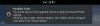
Hello

You can try :
1) connect your user in console mode : CTRL+ALT+F1
2) sudo service XXX stop
3) sudo service XXX start
Where XXX is the Display Manager on your system.
Try lightdm or xdm

You can also reboot the system :
sudo reboot

Bye
 
Hi thank you for your answer

I tried with lightdm it did restarted the X server, but it didn't work anyway… I don't know wether if it's the command which wasn't good or if it's a bug in Parallels Tools…
Parallels team should investigate this.
 
Hi there,

I'd like to mention that I've got the same error:
https://dl.dropboxusercontent.com/u/1625441/ubuntu-error.jpg

Using Ubuntu 13.10, I need to use the following commands:
Code:
sudo stop/start/restart lightdm

Using "restart" doesn't work. Using "stop" and wait doesn't work. Just a cursor blinking and no further start possible. Need to shutdown the VM which leads to the same error like the screenshot above.

What to do?

Would be happy to hear from you.

Cheers,
thowi
 
Any news? Or just the message that Parallel's team doesn't care?
(The solution above doesn't help: I can kill lightdm and restart it and - get the same message.)
 
Last edited:
Any solution?
I've the same problem in Debian 9.3 (Parallels 13 and High Sierra)...
The Action menu says "Parallels tools installation" is running (grey), a message write that it's necessary to log out of the graphical session to apply the Shared Profile...
Ctrl-Alt-F1 doesn't help: I go out of graphic, then login root, and then? How to complete the installation of Parallels Tools?

How to do?

Thanks
Salvo
 

Attachments

  • Schermata 2018-01-31 alle 16.55.51.jpg
    Schermata 2018-01-31 alle 16.55.51.jpg
    49.6 KB · Views: 14
  • Schermata 2018-01-31 alle 16.56.04.jpg
    Schermata 2018-01-31 alle 16.56.04.jpg
    40.3 KB · Views: 11
Last edited:
Found a workaround!
• Deinstall Parallel tools [sudo /usr/lib/parallels-tools/install -r]
• Installa again Parallel tools (help menu Actions or the yellow triangle on top right):
[cd /media/cdrom]
[cp -r * /tmp] otherwise installing from the CD it returns "denied permission"
[cd /tmp] [sudo ./install]
Reboot.
Here it worked.
Salvo
 
  • Like
Reactions: GTD
Back
Top