
Install the app
How to install the app on iOS
Follow along with the video below to see how to install our site as a web app on your home screen.
Note: This feature may not be available in some browsers.
You are using an out of date browser. It may not display this or other websites correctly.
You should upgrade or use an alternative browser.
You should upgrade or use an alternative browser.
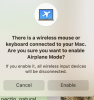
how to disable airplane mode
- Thread starter pininy
- Start date

sergk
Parallels Developers
Hello,
try this:
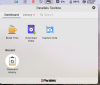
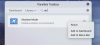
1) Launch "Airplane Mode" tool from Parallels Toolbox window. Tool will be highlighted with white circle inside Parallels Toolbox window (it means tool is active).
2) Launch it again to disable Airplane Mode
After this your message will not pop up at login. If it doesn't help, let me know.
try this:
1) Launch "Airplane Mode" tool from Parallels Toolbox window. Tool will be highlighted with white circle inside Parallels Toolbox window (it means tool is active).
2) Launch it again to disable Airplane Mode
After this your message will not pop up at login. If it doesn't help, let me know.
sergk
Parallels Developers
It doesn't matter. The message you see is a result of incorrect working of "Airplane Mode" tool. To avoid this message popping up you have to enable "Airplane Mode" tool and then disable it again. To do it you need to perform actions that I wrote in previous message.I am on a iMac, don't use any wired keyboard or mouse :-(