by the way is it required to instal de old version PD 10 before upgrading PD 16. If not. this may be the solution for my earlier problem (not able to sign out)I tried to install my PD 10 license on my new mac. But no luck. I'm not able to sign out from my account on my old mac because it's not possible. Please help.

Install the app
How to install the app on iOS
Follow along with the video below to see how to install our site as a web app on your home screen.
Note: This feature may not be available in some browsers.
You are using an out of date browser. It may not display this or other websites correctly.
You should upgrade or use an alternative browser.
You should upgrade or use an alternative browser.
how to deactivate my Parallel Desktop license key and transfer to my new Mac
- Thread starter FabCafeT
- Start date
2020 Macbook Pro, just upgraded to Catalina. Parallels v14, Permanent license. My old laptop ran Parallels ok. Now on the new machine Parallels will start up but in a 14 day trial mode. I no longer need it on the old machine. What do I need to do to Parallels on the old machine, what do I have to do to Parallels to get it to run normally (not in trial mode) on the new machine.
There is no need to install Parallels Desktop 10 for installing Parallels Desktop 16 upgrade. You can install Parallels Desktop 16 and activate it with an upgrade key.by the way is it required to instal de old version PD 10 before upgrading PD 16. If not. this may be the solution for my earlier problem (not able to sign out)
You have to uninstall Parallels Desktop 14 from the old Mac and use the key to activate the same version on the new Mac.2020 Macbook Pro, just upgraded to Catalina. Parallels v14, Permanent license. My old laptop ran Parallels ok. Now on the new machine Parallels will start up but in a 14 day trial mode. I no longer need it on the old machine. What do I need to do to Parallels on the old machine, what do I have to do to Parallels to get it to run normally (not in trial mode) on the new machine.

Maria@Parallels
Problem solver
Hello, we've reset your license key, please check the issue and let us know the results.Hi
I need to register my new mac machine, but I doesn't work.
when I try to register, error message says license is limited.
I can't sign out in my old computer, because it's broken.
could you deactivate my old one, and help me to register my new one?
Hi,
I am having a very difficult time moving my Parallels copy to a new machine. I receive an error that it can't be used to license new computers, even though I have a permanent license. I no longer have the computer that I was using before, and the KB article that is supposed to provide instructions does not work (KB 123956). Could someone please deactivate my licenses so that I can use it on a new computer?
Thank you,
Ian
I am having a very difficult time moving my Parallels copy to a new machine. I receive an error that it can't be used to license new computers, even though I have a permanent license. I no longer have the computer that I was using before, and the KB article that is supposed to provide instructions does not work (KB 123956). Could someone please deactivate my licenses so that I can use it on a new computer?
Thank you,
Ian
We have reset your Parallels Desktop 14 key. Try to activate it and let us know the results.Hi,
I am having a very difficult time moving my Parallels copy to a new machine. I receive an error that it can't be used to license new computers, even though I have a permanent license. I no longer have the computer that I was using before, and the KB article that is supposed to provide instructions does not work (KB 123956). Could someone please deactivate my licenses so that I can use it on a new computer?
Thank you,
Ian
I have the same issue. It used to de-register the previous computer automatically, now it just tells me that it can't do it.
Why make your user's life so hard? You moved from an automatic process to one the forces your users to contact you and for you to do manual work.
It does not make any sense
I no longer have access to the other machine. I am paying a yearly subscription. Please make it easier for individuals to use your product. The automatic process made sure that we cannot use the software on more than one machine anyway. Why remove it?
Why make your user's life so hard? You moved from an automatic process to one the forces your users to contact you and for you to do manual work.
It does not make any sense
I no longer have access to the other machine. I am paying a yearly subscription. Please make it easier for individuals to use your product. The automatic process made sure that we cannot use the software on more than one machine anyway. Why remove it?
Maria@Parallels
Problem solver
Hi, we've reset your key, please check the issueI have the same issue. It used to de-register the previous computer automatically, now it just tells me that it can't do it.
Why make your user's life so hard? You moved from an automatic process to one the forces your users to contact you and for you to do manual work.
It does not make any sense
I no longer have access to the other machine. I am paying a yearly subscription. Please make it easier for individuals to use your product. The automatic process made sure that we cannot use the software on more than one machine anyway. Why remove it?
Isabellel1
Bit poster
Hi please help me, i just subscribed a 1 year subscription and now it says to confirm it with a key from the previous version so i checked in on my account but cant find it !!!!!!!!
DebasmitaM
Forum Maven
Hello, we have sent you a private message. Please help us with your purchased reference number or the license key over there.I just switched from my old mac to the new one. It automatically logged me out of my parallels on my old computer but when i login on my new mac it says the license has reached its limit. I need help ASAP!
konstantin15
Bit poster
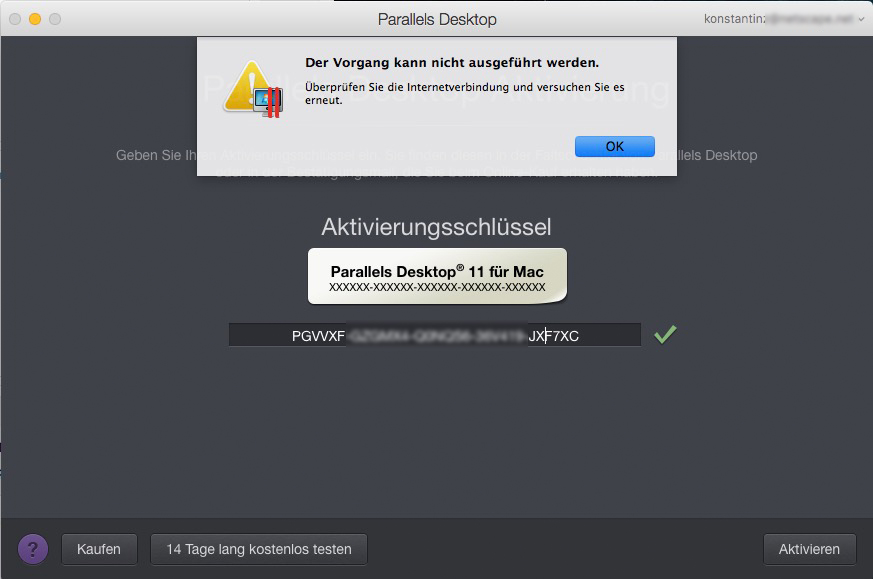
Dear Staff, I had to switch my ssd to another iMac to continue working. Parallels now refuses to sign in due to "internet problems". I can neither log out or use the 14 days test period and I desperately need my PC programs today. Please let me know how to fix this problem.
DebasmitaM
Forum Maven
Hello, which Mac OS you are running?Dear Staff, I had to switch my ssd to another iMac to continue working. Parallels now refuses to sign in due to "internet problems". I can neither log out or use the 14 days test period and I desperately need my PC programs today. Please let me know how to fix this problem.
DebasmitaM
Forum Maven
Hello, thank you for sharing the steps over here.Deactivating a License
You would like a key moved to another person's account.
- Make sure you are on the License Keys tab page.
- In the computer list, select the computer on which you want to deactivate the license, then expand the Actions drop-down menu and click Deactivate.
This May Help,
- Only Parallels Customer Service can remove a key from a Parallels account so that it could be registered under another one.
- Please take note of the following when submitting a key transfer request:
- The request for registration transfer should be submitted by the current owner of the activation key.
- When the key is removed from the current owner's account, a new owner will be able to register it again.
Peter
I am having the same issue. I am trying to sign-out of Parallels Desktop 11 to de-activate it on one computer and activate it again on another. Sign-out on the old one does not work ("Unable to sign out. Please check your internet connection"). The new computer does recognise the license key, but also gives the same message. Both computers run Mojave.
I have tried to go to Parallels on-line to find the License Key Tab but there isn't any or another way to de-activate the license for the old computer. Any suggestions?
I have tried to go to Parallels on-line to find the License Key Tab but there isn't any or another way to de-activate the license for the old computer. Any suggestions?
DebasmitaM
Forum Maven
Hello, you do not need to sign out from your old computer. Kindly follow the steps from this KB article for activating Parallels Desktop on your new computer.I am having the same issue. I am trying to sign-out of Parallels Desktop 11 to de-activate it on one computer and activate it again on another. Sign-out on the old one does not work ("Unable to sign out. Please check your internet connection"). The new computer does recognise the license key, but also gives the same message. Both computers run Mojave.
I have tried to go to Parallels on-line to find the License Key Tab but there isn't any or another way to de-activate the license for the old computer. Any suggestions?
As mentioned, activating on the new computer which runs the same OS doesn't work regardless. It also gives a message: "Unable to sign in. Please check your internet connection". My UID and password are correct and no firewall is enabled. So the steps as described in that KB article cannot be executed.Hello, you do not need to sign out from your old computer. Kindly follow the steps from this KB article for activating Parallels Desktop on your new computer.
Cassandra1
Bit poster
Hi,
I'm trying to deactivate my account and activate it on to a different computer, but I can't seem to get it working still.
I have tried the previous advise but still no luck.
Thanks
C.
I'm trying to deactivate my account and activate it on to a different computer, but I can't seem to get it working still.
I have tried the previous advise but still no luck.
Thanks
C.