How can I remove the upload/download/disconnect button in Parallels Client window

StevenM5

Bit poster
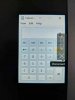
We are currently running the Parallels Client in Kiosk mode. It just so happens that the user has to click right where the action bar shows up on the right hand side. I have been looking around but can not find a way to move it or disable it completely. I have attached an image to give an idea of what I am talking about. Any help would be greatly appreciated.

Thanks, httpSteve
 

Attachments

  • action-bar.jpg
    action-bar.jpg
    9.5 KB · Views: 8
@StevenM5 I do not know how to hide the action bar. However, the upload and download buttons will not be shown if you deselect "Allow file transfers" in "Gateway properties > HTML5 > Restrictions". Hopefully that will be enough to allow the right click until the action bar is made moveable or auto-hideable.
 
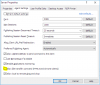
Thank you @jpc unfortunately that did not quite work for me but lead me in the right direction. I had to also deselect "Allow file transfers command (HTML5 and Chrome clients)" in "RD Session Hosts > properties > Agent Settings". I have included a screenshot to show you. I appreciate your help on this issue, hopefully I can find a permanent fix soon as it still overlays on the application for the client.
 

Attachments

  • RD-Session-Hosts-Settings.PNG
    RD-Session-Hosts-Settings.PNG
    17.6 KB · Views: 8
  • Like
Reactions: jpc
Back
Top