
Install the app
How to install the app on iOS
Follow along with the video below to see how to install our site as a web app on your home screen.
Note: This feature may not be available in some browsers.
You are using an out of date browser. It may not display this or other websites correctly.
You should upgrade or use an alternative browser.
You should upgrade or use an alternative browser.
High cpu usage due to bsdtar process
- Thread starter CarlB7
- Start date
ViacheslavK
Member
Same issue here. PD 15 with toolbox from v13

Maria@Parallels
Problem solver
Hi, please collect the tech report once the issue reproduced and post the report's ID here.Same with bsdtar and the offending files. Quitting the process via Activity Monitor is the only thing that seems to work. Parallels and Mac OS fully updated. Re-occurs when I reboot and restart Parallels. PLEASE FIX.
Thanks in advance.
Maria@Parallels
Problem solver
Does the bsdtar process run only when Toolbox is working?Sorry for the delay, Maria@Parallels, I have submitted my report number: 326622487. It seems that the bsdtar process doesn't run all the time, but on some periodic (weekly?) cycle.
Yes, that's correct. I thought the problem had fixed itself as I had started using Toolbox again without problems. But then the process came back.Does the bsdtar process run only when Toolbox is working?
I should add that I haven't noticed the same problem on my MacBook Pro where I have a separate full license for Toolbox (and Parallels is not installed). I can't absolutely guarantee that it hasn't happened, but I haven't encountered it.
Maria@Parallels
Problem solver
One more question, when you use Parallels Toolbox without Parallels Desktop, you don't see the bsdtar process? And when you start Parallels Desktop without Parallels Toolbox do you see this strange process?Yes, that's correct. I thought the problem had fixed itself as I had started using Toolbox again without problems. But then the process came back.
I should add that I haven't noticed the same problem on my MacBook Pro where I have a separate full license for Toolbox (and Parallels is not installed). I can't absolutely guarantee that it hasn't happened, but I haven't encountered it.
Yes, I think that is correct, but it would be better to say that I haven't noticed it on my MacBook which only has Toolbox installed. It only appears to be associated with Toolbox, however. It does not appear if Toolbox is not running (but Parallels Desktop is). However, it does not always appear if Toolbox is running, only periodically.One more question, when you use Parallels Toolbox without Parallels Desktop, you don't see the bsdtar process? And when you start Parallels Desktop without Parallels Toolbox do you see this strange process?
Hope this makes sense.
Maria@Parallels
Problem solver
OK, thanks a lot for clarification.Yes, I think that is correct, but it would be better to say that I haven't noticed it on my MacBook which only has Toolbox installed. It only appears to be associated with Toolbox, however. It does not appear if Toolbox is not running (but Parallels Desktop is). However, it does not always appear if Toolbox is running, only periodically.
Hope this makes sense.
Once the issue reoccurs, could you please collect two reports: from Parallels Toolbox and From Parallels Desktop too. Please post both reports' IDs here.
Looking forward to your reply.
Garden City Nick
Bit poster
For your records I am adding myself to this thread as I had the same issue this morning, also on P15. Parallels was not running or toolbox but had 3 instances of the BSDTAR process each using 100% cpu, my fan was going crazy. Staying tuned for updates. I'm also on Catalina 10.15.1 (19B88) with the latest and greatest Parallels.
Maria, I have the same problem and just submitted two reports as you requested. They are P327102464 and P327102548. This is running on an iMac with Catalina 10.55.1 and Parallels Pro 15.1.1 with Toolbox 2.6.1. Right now I have the bsdtar process running 8 processes at the same time.
jonnybradley
Bit poster
Same issue here
MichaelT32
Bit poster
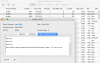
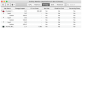
Same problem here. CPU at 100% and fan running fast for three hours until I stopped the tree bsdtar processes.
RichardC25
Bit poster
Hello Parallels Team,
I am having the same problem. But, I have some additional information. I hope it is related.
Related Case numbers
Toolbox #327215283
Parallels #327216159
Version Info
Catalina 10.15.1, Parallels 15.1.1, and Toolbox 2.6.1
Notes / Procedures taken to fix issue (I suspect only temporarily)
Richard
I am having the same problem. But, I have some additional information. I hope it is related.
Related Case numbers
Toolbox #327215283
Parallels #327216159
Version Info
Catalina 10.15.1, Parallels 15.1.1, and Toolbox 2.6.1
Notes / Procedures taken to fix issue (I suspect only temporarily)
- Slow down of system periodically. Unfortunately, I've only thought about running Activity Monitor Twice:
- First time, I came to this forum, shutdown parallels & toolbox, rebooted the system, updated Parallels and Toolbox. Macbook Pro (13-inch, Early 2015, 8GB, 512GB SSD) seemed to be fine until last week. Slow down of system last week was not enough for me to justify an investigation.
- Second occurrence, Tonight, the system became REAL SLOW after trying to start Excel for Mac.
- The Apps being actively used (don't remember background / minimized):
- Chrome (with 4 tabs)
- Evernote
- Steps taken to diagnose:
- Started activity monitor and found 5-6 'bsdtar' processes executing with high cpu utilizations.
- Performed Google Search to discover this thread.
- Found where 'Maria@Parallels' was advising everyone to perform 'collect the tech report'
- I collected Toolbox Tech Report
- I collected Parallels Tech Report
- While investigating bsdtar processes, I saw a "_windowserver" process with high utilization. So, I killed it since parallels was not running and suspected it to be the culprit.
- bsdtar processes disappeared from Activity Monitor for a while - seemed all was better.
- returned to my other tasks, noticed another degradation in performance.
- opened Activity Monitor again and found 9-10 bsdtar processes.
- quit Parallels Toolbox & Parallels
- killed "_windowserver" process
- rebooted system
- As of now, system seems to be fine. The '_windowserver' process is running and system performance seems to be fine.
Richard
A
Abhishek@Parallels
Hi Guys,
Please try to remove this log file "/Users/---/Library/Logs/ParallelsToolbox/toolbox_report (3).xml.tar.gz" and reboot the Mac. Observe Activity Monitor after reboot and check if it helps.
Please try to remove this log file "/Users/---/Library/Logs/ParallelsToolbox/toolbox_report (3).xml.tar.gz" and reboot the Mac. Observe Activity Monitor after reboot and check if it helps.
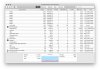
Hi @maria, I've just submitted two further reports: 327280020 (Toolbox) and 327280363 (Desktop). Sorry to take a while to do this but I forgot that I had stopped Toolbox from running! As soon as I started it again, the bsdtar processes appeared again. As LudwigS has shown, so I also enclose a screen shot from Activity Monitor showing that the processes and Toolbox are connected.
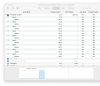
Ah, just a moment, though.
I've just checked on my MacBook Pro (where I haven't noticed the bsdtar problem), and that is running Toolbox 3.7.0 (build 2768). This machine does not run Parallels Desktop and so has a separately licensed copy of Toolbox. I also note that Toolbox has just updated and the message was "Improved compatibility with macOS Catalina".
However, my iMac which has had the problem is running the copy of Toolbox that comes with Parallels Desktop 15 Pro (version 15.1.1 build 47117). This version of Toolbox is only 2.6.1 (build 1620). In other words, it seems to be a whole version behind. However, when I check for updates, it tells me that I have "the latest version of Parallels Toolbox".
Is this the problem, that the version of Toolbox is out-of-date???
I've just checked on my MacBook Pro (where I haven't noticed the bsdtar problem), and that is running Toolbox 3.7.0 (build 2768). This machine does not run Parallels Desktop and so has a separately licensed copy of Toolbox. I also note that Toolbox has just updated and the message was "Improved compatibility with macOS Catalina".
However, my iMac which has had the problem is running the copy of Toolbox that comes with Parallels Desktop 15 Pro (version 15.1.1 build 47117). This version of Toolbox is only 2.6.1 (build 1620). In other words, it seems to be a whole version behind. However, when I check for updates, it tells me that I have "the latest version of Parallels Toolbox".
Is this the problem, that the version of Toolbox is out-of-date???