I wasn't able to get it working, but will post my experience so far. Thanks everyone for looking into it!
Software is LONATI Digraph3+ (created by DINEMA), used to program industrial knitting machines.
M2 Max MacBook Pro, Ventura 13.4.1
- As a temporary solution, I got everything running in Windows 7 via UTM (emulation). Performance is roughly 30% compared to Windows running in Parallels on a i9 MacBook Pro, but only after forcing multi-core support in UTM settings and increasing it to 4 cores. My workload is mainly single-threaded, so depending on your use case you could bump it to maximum (with the drawback that macOS speed will decrease). UI is snappy enough to be usable.
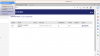
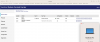
- On the i9 MacBook Pro, in Windows, the dongle is NOT visible in http://localhost:1947/_int_/devices.html. Only the DEMOMA evaluation key is present. However, everything works fine, and the dongle red light is on. Perhaps not all dongle versions show up, even though they work?
- In my case Rosetta 2 was already installed, since I was already using some x86 apps.
- By default, macOS Ventura came with Firewall disabled.
The software I'm using seems to have a two-stage check.
- On the i9 Mac via Parallels (or M2 UTM), when the Sentinel Runtime is not installed, it throws the error "Install protection driver". When the driver is installed but the dongle is not connected, a different error shows up "Keys DIG3PLUS or DIG3+UPGRADE not found".
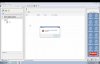
- On the M2 Mac, I get the error "Install protection driver", regardless of the HASP or Runtime status. I couldn't get past it.
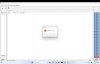
Maybe there is a different method used by the software to check if the Runtime is installed, other than trying to communicate via port 1947?
I tried installing the Runtime both on Windows and macOS, and then doing the portproxy. Nothing changed.
Another thing is that I tried accessing
http://localhost:1947/_int_/devices.html in Windows after doing the portproxy to
andreis-macbook-pro.lan. It wasn't working, so I also tried
andreis-macbook-pro.local.
That way, instead of no reply at all, I got a "403 Forbidden" page. Not sure if it's supposed to be working or not, and whether
.lan vs
.local is supposed to change this.
One alternative I can think of is to try to use UTM exclusively for the Sentinel Runtime, with the USB HASP connected to it, and Parallels to just run the software.
I also tried using the i9 Parallels Mac with a working setup as the host, but it didn't change anything in my case. It should work, theoretically.
I will try to get in touch with Dinema (the creator of the software) to see if they have any suggestions. If I receive any good input I'll follow up, maybe it applies to other scenarios as well.