HASP driver on M1 Max Macbook w/Parallels Windows 11

ARGAS

Junior Member
Hi everyone!

As on daily basis I was using two machines:
Workstation PC for high-end work;
Macbook Pro 2014 for working on-site with bootcamp and Windows 10.

Since my laptop was also used for creatingarchitectural models, there was a need to switch. Macbook Pro 14 /w M1 Max CPU it is then.
I installed Parallels since bootcamp is no longer supported. I also installed needed apps BUT after connecting Sentinel Dongle with particular app's license on it, this app cannot find my USB thumb drive/w License. I tried reinstalling HASP driver but it gave me not success. Is there anyone who was able to make it work?
icon_e_geek.gif


Best regards,
Karol
 
Ding ding. Windows ARM has almost no users, so funky hardware like USB licensing, serial adaptors, etc.. good luck.

This may get better if more Windows ARM devices come out. but the current crop is garbage (not including Macbooks).

Depending on the software, maybe you'd have better luck finding a crack for it to bypass the licensing. Otherwise, it's on the software vendor to update their stuff (good luck there.. since you're running an unlicensed copy of a Niche OS within virtualization).
 
Okay, thank you for answers.
Is there ANY way to install normal retail x64 version of Windows then? Or, is it possible to run x64 emulation on ARM version? I think that could help. What do you think @MichaelH63 and @MikeH27 ?
 
So I guess it's all for nothing then.
It's a shame because the only thing not working is the "reading-license-tool".

Best,
Karol
 
Dealing with the same issue.....
Yeah, I wish I know to whom I should speak about that issue. I think it is not Parallels or Mac fault, just lacking specific driver for the platform. It is a shame because you pay for the software that should work and someone who use cracked version is laughing in your face... :(

Best,
Karol
 
Update:
According to that page: https://docs.sentinel.thalesgroup.c...otes/130-Supported_Platforms_for_Sentinel.htm
Which I guess is the owner right now of Sentinel hardware, Parallels 17 for Mac should work with those dongles. What am I missing then?
ARGAS, on page you mentioned there is no reference to Windows on ARM. Only Intel versions mentioned there:
"Windows: x86 and x64 versions of the following:"
So it should work with Parallels Desktop 17 for Mac but on Intel Macs.
 
ARGAS, on page you mentioned there is no reference to Windows on ARM. Only Intel versions mentioned there:
"Windows: x86 and x64 versions of the following:"
So it should work with Parallels Desktop 17 for Mac but on Intel Macs.
Shame, to be honest. Hopefully they will see potential of the platform and will do something about it. Windows 11 is still fresh thing though... That force me to have two machines instead of one.

Best,
Karol
 
Hi, I've been struggling with the same issue since getting an M1 Mac, so I feel your pain.

From memory, I believe I found that there were Sentinel Drivers available but they could not be installed on an Insider Preview build of Windows, which is what the M1 Macs require for Parallels to work. Haven't looked into it in a while, so there may be some updates but that was October/November time and I occasionally look out for posts like this just incase anyone else makes some progress.
 
Hi, I've been struggling with the same issue since getting an M1 Mac, so I feel your pain.

From memory, I believe I found that there were Sentinel Drivers available but they could not be installed on an Insider Preview build of Windows, which is what the M1 Macs require for Parallels to work. Haven't looked into it in a while, so there may be some updates but that was October/November time and I occasionally look out for posts like this just incase anyone else makes some progress.
Hi,
I already have Windows 11 Installed and I was checking on drivers daily: it changes nothing, unfortunately.
I am still waiting for Thales to respond.
 
HI everyone, have same problem, and forced to use two machine now as well, I will try to contact Thales, hope that will help us! :)
 
Same here. I think it's Thales responsibility to offer these drivers. Also there are also linux arm64 drivers. So it's not soooo far away.
They only possibility I found out so far, is to emulate a x64 CPU with UTM. But windows 10 is slow like hell so the only working OS is Windows 7. But well... it's nearly unusbale. I also tried then to share the HASP Key via USB Network Share from UTM Windows 7 to Windows 10 ARM. The device is recognized but without the driver it's still not working :(
 
Hi! I have been chatting on a different forum, but I think it relates closely to this. I use an optical design SW "OpticStudio" by Zemax. I used to run it on my old Intel Mac under Parallels, but now can't run it on my M1 Macbook (Parallels to 17). I have worked with tech support both from Zemax and Parallels, but nobody has a solution. I have Windows 11 (not an Insider version). The SW uses Sentinel/Thales for license management, and neither the License Manager nor the SW itself will launch. I've seen stuff about Microsoft releasing Win11 specifically for ARM, but isn't this what I already have? Does anyone have an idea how to solve the problem of running this SW?
 
@JoelS9 Hi, how did you get hold of the version of Windows 11 that's not an insider version? My understanding was that this was the big problem with being able to install the Sentinel Hasp drivers (it says on their website that they specifically don't support insider preview). I'm wondering if someone else can have a go at this with a full version, to see if we can get a Hasp to work?
 
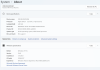
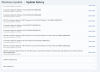
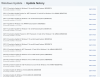
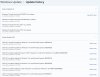
Hi! I don't remember the details of how I got into non-Insider WIN11. While I had the WIN10 Insider, I kept updating it periodically. I think that during one of these updates I simply got WIN11 installed. I have attached my Update History in 3 screen shots #1-#3. I have also attached my System Information as screen shot #4.
 

Attachments

  • Screen Shot #4.png
    Screen Shot #4.png
    630.8 KB · Views: 47
  • Screen Shot #3.png
    Screen Shot #3.png
    873.9 KB · Views: 33
  • Screen Shot #2.png
    Screen Shot #2.png
    1,014.7 KB · Views: 36
  • Screen Shot #1.png
    Screen Shot #1.png
    859.4 KB · Views: 43
Hi, from the posts I've read, we are not alone (Mac Silicone with Win 11 ARM, and no Sentinel HASP Driver), but I guess we are still not enough to get's (Thales/Sentinel) attention. I suggest that we all create a case at Thale's support site asking for the same, and hopefully later this year they can release a Driver for Win ARM. Good luck!!
 
I am also searching for a solution for this. I contacted the software company (Hexagon) that my hasp is from, they helped me as far along the process until the licensing driver issue. Then they just stated they don't support ARM.
 
Unfortunately there's nothing you can do then. Drivers can't be emulated by Windows, so until the software company provides an ARM driver or Microsoft adds a generic driver that works, you're out of luck.


Did you fail to read the rest of the thread? The issue is not my software provider, nor Microsoft. It's Thales/Sentinel. The same as everyone else here...
 
Back
Top