
Having looked through the forums, there appears to be an issue with USB com ports with windows 11, Parallels and MX Macs.
There have been a number of suggestions in this forum from removing device drivers in Mac OS before running the VM and then manually installing ARM based drivers, etc. There does not appear to have been any comprehensive guide written to dealing with what is obviously a major bug. Surely, the reason that people have parallels is to run software they can't run on the native OS. In my case this will be Autodesk Inventor (which runs poorly on Parallels) and programming software that is not available on Mac - PLC programming, etc.
I have read the guide here; https://kb.parallels.com/en/6318
I have read a bunch of forum posts.
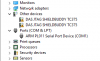
I have added the serial port and matched it to the USB serial device. However, when I run Windows in the VM, it can see the serial port created, but it can't match it to the device which shows up in "Other Devices".
Any help appreciated.
There have been a number of suggestions in this forum from removing device drivers in Mac OS before running the VM and then manually installing ARM based drivers, etc. There does not appear to have been any comprehensive guide written to dealing with what is obviously a major bug. Surely, the reason that people have parallels is to run software they can't run on the native OS. In my case this will be Autodesk Inventor (which runs poorly on Parallels) and programming software that is not available on Mac - PLC programming, etc.
I have read the guide here; https://kb.parallels.com/en/6318
I have read a bunch of forum posts.
I have added the serial port and matched it to the USB serial device. However, when I run Windows in the VM, it can see the serial port created, but it can't match it to the device which shows up in "Other Devices".
Any help appreciated.