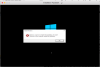
When attempting to install Win 10 Pro via ISO (downloaded from MS today) using Parallels 13 on a 2017 MacBook Pro running Sierra, I make it through the part of the install process where it claims to install files, and then I get an error pop-up: "Install Windows", "Windows could not complete the installation. To install Windows on this computer, restart the installation." (screenshot attached) I have followed several recommendations found online regarding setting the admin password, and removing password requirements. Neither worked. Attempted this several times without success. I'd appreciate any guidance.

GuestOS Install error: Parallels 13, Windows 10 Pro, ISO, 2017 MBP
- Thread starter AdamS15
- Start date