Bug: Full Screen mode shows a thick title bar on top of a macOS guest VM
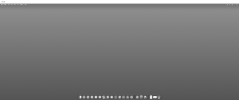
Since upgrading to Parallels Desktop 27.0.0 (build 58628), the macOS guest VM window shows a large solid title bar (with the VM's name, e.g. "macOS") across the top of the screen even while the VM is in full screen mode. This did not happen before the upgrade.
Host: MacBook Pro M5 Max running macOS Tahoe 26.6.2.
Guest: macOS VM named "macOS", macOS Golden Gate 27.0 (latest)
Parallels Desktop: 27.0.0 (build 58628), Apple Silicon
Steps to reproduce:
1. Start the macOS guest VM.
2. Enter Full Screen mode (View > Enter Full Screen, or Ctrl+Cmd+F).
3. Observe a thick white title bar remains visible across the top of the screen instead of being hidden, as it was before the Parallels 27 upgrade.
Troubleshooting already tried, none of which resolved it:
- Exiting and re-entering Full Screen mode.
- Fully updating and restarting the macOS host.
- Fully quitting and relaunching Parallels Desktop (not just closing the VM window).
- The "Scale to fit below built-in camera" / notch scaling settings some other full-screen bugs reference are not applicable — those options aren't exposed for macOS guest VMs, only for Windows/Linux guests.
I searched the forums and the Parallels Desktop 27 "updates summary" KB article and could not find this already reported. Screenshot attached showing the title bar in full screen. Has anyone else seen this on Parallels 27, and is there a known fix or workaround?
Since upgrading to Parallels Desktop 27.0.0 (build 58628), the macOS guest VM window shows a large solid title bar (with the VM's name, e.g. "macOS") across the top of the screen even while the VM is in full screen mode. This did not happen before the upgrade.
Host: MacBook Pro M5 Max running macOS Tahoe 26.6.2.
Guest: macOS VM named "macOS", macOS Golden Gate 27.0 (latest)
Parallels Desktop: 27.0.0 (build 58628), Apple Silicon
Steps to reproduce:
1. Start the macOS guest VM.
2. Enter Full Screen mode (View > Enter Full Screen, or Ctrl+Cmd+F).
3. Observe a thick white title bar remains visible across the top of the screen instead of being hidden, as it was before the Parallels 27 upgrade.
Troubleshooting already tried, none of which resolved it:
- Exiting and re-entering Full Screen mode.
- Fully updating and restarting the macOS host.
- Fully quitting and relaunching Parallels Desktop (not just closing the VM window).
- The "Scale to fit below built-in camera" / notch scaling settings some other full-screen bugs reference are not applicable — those options aren't exposed for macOS guest VMs, only for Windows/Linux guests.
I searched the forums and the Parallels Desktop 27 "updates summary" KB article and could not find this already reported. Screenshot attached showing the title bar in full screen. Has anyone else seen this on Parallels 27, and is there a known fix or workaround?