Fedora 19 and Parallels Tools

Fedora 9 Parallel Tools

Fedora 19 runs, but not parallels tools.

Installer fails on building kernel modules.

Parallel Tools run just fine but theres some graphic issues, Parallels video driver and Fedora isn't playing nice with each other.
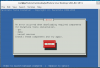
 
Last edited:
Hello, I'm new to Parallels and had no trouble migrating the Windows XP I had on my Macbook's VMWare to Parallels, and then I got rid of all the VMWare files. Now I'd like to install a Linux OS into the Parallels VM but it's very different from VMWare and I can't follow yet how to install one. I have a choice between Linux Mint 10 DVD on a 32GB USB Flash Drive (64-bit) or Fedora KDE Core 12 x86_64 Live CD (I also have a Fedora GNOME Core 12 x86_64 Live CD but I already read a Parallels article about problems with the GNOME and the remedy suggested was to use the KDE.) When VMWare was running I could find "Add an OS" but now that I have Parallels running and can see the two red vertical lines in my Macbook's menu, however in there I see Devices, Exit Coherence, Request Support, etc, but I don't see how to add a Linux OS. Can anyone suggest how a novice can get a start with adding either Linux Mint 10 DVD on a 32GB USB Flash Drive (64-bit) or Fedora KDE Core 12 x86_64 on a Live CD?
 
I just took a look at my Windows XP Applications and the Chinese and Japanese word-processors and other language tools I had installed on the Virtual Machine I had with VMWare are very easy to access. Parallels looks very good for those applications. I wonder if all I have to do is insert my Linux 10 USB or my Fedora KDE Live CD for Parallels to pick up that I'm wanting to add another OS? I'm just worried being such a novice that I will damage the Mac OS fiddling around without having found instructions to follow.
 
I just took a look at my Windows XP Applications and the Chinese and Japanese word-processors and other language tools I had installed on the Virtual Machine I had with VMWare are very easy to access. Parallels looks very good for those applications. I wonder if all I have to do is insert my Linux 10 USB or my Fedora KDE Live CD for Parallels to pick up that I'm wanting to add another OS? I'm just worried being such a novice that I will damage the Mac OS fiddling around without having found instructions to follow.

Parallels provides some installers, but if you're bringing your own, choose advanced or whatever. I don't think Parallels will boot a VM from USB. Their VM BIOS doesn't support it. Instead of using USB stick images to install, download DVDROM images and select that as install media. If you get to an advanced level, you can make a hard drive image that will allow you to install from USB stick. That's something to aspire to later.
 
Parallels Tools would not install for me. It says it needs gcc, make, and kernel sources. I installed them (sources are no longer there, so I installed "kernel Development Tools"). But I still cannot get Parallels Tools to install. I have Parallels 9.
 
I have the same problem, GCC kernel headers make etc.. is installed, but the installer simply does not want to install. Parallels 9 here as well.
 
Parallels Desktop 9 Parallels Tools installs just fine for me.

Despite the xorg configuration now working, it still appears to lack proper graphics acceleration (as though the module didn't load).

Also, passing any USB devices (webcam, usb keys, etc) fails to work in the guest. This is not limited to Fedora, I've tested with Debian too.

**Edit**

Worth mentioning that Gnome3 is the only desktop environment I have graphics glitches in. I believe that is because it is dependent on 3D Acceleration. I have tried MATE and Sugar without any issues. On another note, you can install multiple desktop environments and select them at the gdm login screen ("session" is a drop-down menu). It will remember your last choice. I believe the KDE environment is: `yum groupinstall "KDE Plasma Workspaces"`. Once you're in you can (probably) remove the gnome3 desktop with group remove.
 
Last edited:
Parallel Tools run just fine but theres some graphic issues, Parallels video driver and Fedora isn't playing nice with each other.

I installed Fedora 19 and ran into fatal error when I was adding accounts during first boot. Rebooted and went through setup. Certain parts of the screen cause the ui to be blue depending on where the mouse points.
 
Fedora 17 reached end-of-life two months ago. I want to upgrade but Parallels 8 STILL doesn't support the newer releases of Fedora. It's time they gave us the source to Parallels Tools so we can fix it for ourselves.
 
I still cannot install Parallels Tools on Fedora 19 with Build 9.0.23062. It says components are missing, but I do not know how to get them.
 
I mounted the folder with -o exec, then ran ./install from the cdrom folder. It automatically downloads missing components last I recall.

Any chance you can screenshot or copy/paste the output here?
 
Can't quite do what you suggest

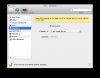
fedora.png
I use the "install Parallels Tools" menu to mount the drive, which is at /run/media/jar/Fedora-Live-Desktop-x86-_64-19-1
Notice that I m root. There is no install in this directory. install-tools.sh seems to do nothing.
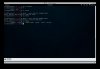
installer.x86_64 yields the attached screen shot. So what am I doing wrong?

I have gcc and make installed. Not sure how to get the kernel source--I thought it was no longer distributed with Ubuntu.
 
Last edited:
AFAIK "kernel sources" is referring to "build-essential" package specific to debian/ubuntu. I believe the equivalent in fedora is `yum groupinstall "Development Tools"`, which is installed on my machine.

---

To confirm the contents of the cdrom I just spun up my Fedora 19 Parallels VM to give it a look.

Opened a terminal and ran:
Code:
    sudo su
    cd /media
    mount -o exec /dev/src /media/cdrom
    cd cdrom

Inside my file list is:

Code:
    install*
    installer/
    install-gui*
    kmods/
    tools/
    version
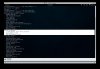
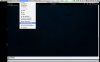
If I cat version I get "9.0.23062.920702".

If I run `./install` it asks if I want to upgrade or remove (since I have already installed it).

If you have something wildly different than this then perhaps our versions of Parallels or Fedora are not the same?
 
I think Development Tools is installed since the command yielded "No packages in any group available to install or update".
I don't have a Parallels CD. I just have a dmg file for it. What CD rom are you referring to?
 
Just to confirm, you are running Fedora 19 inside Parallels Desktop 9 on an OS X machine?

If you run `yum grouplist` it should display installed packages:

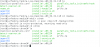
version_and_grouplist.jpg

When you want to install parallels tools you use the menu to select install/reinstall:

Install_Tools.jpg

If you check your configuration this should have set the CDRom to an iso for parallels tools which is somewhere in ~/Library (or /Library I forget):

tools_iso.jpg

Generally, if you have a GUI environment running, it will automatically mount the CDRom, but without execution rights. So you may have to run `df` first to find the mount point then `umount` on it to release it. Then you should be able to mount it as you like, with exec:

mount_with_exec.jpg
 
Hmmmm.

fedora.png
Yes, the iso is pointed to by the CD in Hardware for Parallels 9 and Fedora 19. And yes the Development Tools are installed.
But there is no CDROM mount point in /media, nor is there a /PSF.

fedora2.png

It does not mount the iso at its root. I always get its mount at the tools directory:
fedora3.png
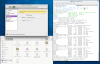
So in Fedora, I do not see what I see on the Mac looking at the same iso.
 
Last edited:
Back
Top