Facetime camera stops using MS Teams in Windows 10

MarkW34

Bit poster
Is anyone else having issues with the Facetime Camera (Imac) causing issues in Windows. It works fine for around 1 minute then I get a message about the camera has stopped working.
I'm using the latest version of teams, Windows 10 Pro with the latest patches and Parallels 15.1.4 Home.
Thanks Mark
 
I have the same problem!
First it works. About 1 minute later the whole windows graphics freeze (not even mouse can move), but the audio and microphone still work! Then after another minute it usually recovers - but not always (see next).

Today (again) I got the following error message:
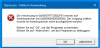
upload_2020-5-20_9-16-42.png
It seems like a memory allocation error.
After a few more minutes my Windows was suspended by Parallels - which it never did before when this happened. After resume, everything was still there.

Previously I had these issues also with audio-only, but I could resolve this with setting the hypervisor to "Apple" in Configuration->CPU & RAM -> Extended Settings (?) -> Hypervisor.

Parallels Desktop 15 for Mac Pro Edition
Mac: MacBook Pro 16" 2019, Catalina 10.15.4
Guest: Windows 10 18363.836 x64
Hypervisor: Apple, no nested or PMU virtualization
Audio: AC97, not synced with mac, out on external monitor, input from
Cam: shared with mac
External monitor connected via USB-3 (LG 43UD73-B)
RAM: on the recommended-max value (12288MB of 16GB)
 
I have the same problem - video call with MS Teams on my Windows 10 VM. Teams becomes very unstable on the first couple of video calls in the morning, especially with more than one participant. Computer resources go through the roof (CPU and memory) and everything freezes up - sometimes, the whole machine crashes. If I can get through the initial problem, it seems to settle down and behave well subsequently. MAC and Windows OS and Parallels all on latest version. 32MB RAM shared 50/50.
 
Same problem has been mentioned and reported by me. All the description here are accurate. The trouble is caused by a (graphics?) memory error when MS Teams is used with the Facetime Camera (MacBook Pro in my case). I do not know about the Apple hypervisor though. It brings its own problems.
 
Just adding that I'm seeing the same here... Video in Teams randomly freezes, and often I get the memory allocation error later on. What I will add here that I have not seen mentioned is that this seems to be specific to MS Teams in the VM, not the use of the Facetime camera in Parallels "in general"... because Zoom calls work perfectly fine in my Win10 VM using the same camera. I too am on Catalina (though it happened in Mohave, too) running latest Parallels and the WIn10 Pro VM has 16GB RAM and 4 CPUs.

For now I've had to resort to keeping Teams open on the MacOS side just for video calls.
 
Hello Maria,
Is there any progress yet?
I recently experienced the same problem with Office 365 apps as well. And a lot of people already reacted to that problem in a different thread on this forum.
OSX sometimes crashes and presents you the login screen again. In my case as a result TimeMachine gets stuck in "Preparing backup" because the local temporary backup has been corrupted. Happened to me twice so far. I needed to disconnect the external drive, wipe it and do a clean full backup again. Until the next crash ...
As you can see this really needs to be resolved!
Theo
 
Hello Maria,
Is there any progress yet?
I recently experienced the same problem with Office 365 apps as well. And a lot of people already reacted to that problem in a different thread on this forum.
OSX sometimes crashes and presents you the login screen again. In my case as a result TimeMachine gets stuck in "Preparing backup" because the local temporary backup has been corrupted. Happened to me twice so far. I needed to disconnect the external drive, wipe it and do a clean full backup again. Until the next crash ...
As you can see this really needs to be resolved!
Theo
Hi, as we know this issue is still under investigation.
Could you also please collect a tech report and provide us with the screenshot of the issue?
 
Hello Maria,
Actually, No. It's impossible to collect a tech report and/or a screenshot of the issue. Because everything stops working: first the Windows 10 VM together with Parallels Control Center and in some cases the whole MacBook Pro goes into a kernel panic and goes back the login screen. In none of these cases a report is created of the issue by OSX, Parallels or Windows !0.
I have send a report anyway just before starting Microsoft Teams. Hope this will give some useful information anyway.
New information: in another Windows 10 VM I use Skype for Business and guess what: it stops responding every few minutes during a meeting with camera and desktop sharing. It gets better when I use 6 GB instead of 4 GB memory.
Theo
 
I get this problem too with Parallels crashing during a Teams call when using the iMac FaceTime camera. Is there any update on a fix for this?
 
Just to confirm I have the same problem, I also upgrade to
Version 16.0.0 (48916)
And the problem still persist.

I bought a USB webcam and attached to the the VM and team is working fine. SO it's definitively an issue with the FaceTime camera and the VM.
Hope this helps!
 
Thank you iGagy for the confirmation that it has to do with the FaceTime camera.
Some additional information: on my MBP 2015 with Catalina and Parallels 15 -> Windows 10 with Office (365 or 2016) stops responding repeatedly for half a minute or longer when I use the FaceTime camera with Teams or Skype for Business. In some cases the screen goes black and forces you to login again in OSX and tries to bring OSX, Parallels and active VMs back from some kind of hibernation. I checked the Parallels log file and it says it looses connection with the VMs at that point. But no error logs are created! I noticed CPU spikes of almost 100% even when the VM uses 4 cores, 8 GB of RAM and 1 GB of graphics memory.
Important: this does not happen with the same VMs and Parallels 15 in High Sierra on my MBP 2011 !
 
Hi TheodK,

same type of errors for me, MBP 2019, Catalina, parallel 16 - Windows 10 with O365.
After a few minutes on team (if webcam is on) both the VM and Mac OS freeze and come back after a 30-60 seconds. Sometime I also get the login screen of MacOS as well.
I have 2 CPU and 8 Gig of ram on the VM (16 Gig on the host).

No issues at all if I select the USB webcam on the VM instead of FaceTime camera or if I leave the camera disabled in teams.
 
I have the same issue, MS Teams uses >70% of CPU (2018 15.6 MacBook Pro) and then the whole machine just freezes, Ive just updated to Parallels 16 in the hope it Wass better (Its not). I have the same problem when using either the MBP camera or the Cinema Display camera. I had read this was a graphics issue when using a second screen but have tried EVERY single setting with no joy. PLEASE FIX IT or ill be forced to go against my religion and use a windows laptop :(
 
Back
Top