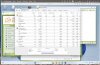
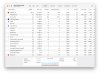
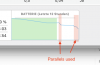
Hello, I've noticed extreme CPU and battery strain when Parallels is running. In Parallels Windows, I was only using a simple text editing program and no games or other high-performance applications. Despite this, my M2 MacBook Air gets very hot, and the battery drains incredibly fast, about 1% every 2-3 minutes. Please see the screenshots. The CPU load is 396%. Is this normal? If not, is it possible to fix it?

Install the app
How to install the app on iOS
Follow along with the video below to see how to install our site as a web app on your home screen.
Note: This feature may not be available in some browsers.
You are using an out of date browser. It may not display this or other websites correctly.
You should upgrade or use an alternative browser.
You should upgrade or use an alternative browser.
Extreme Battery and CPU Usage with Parallels
- Thread starter Bandabi
- Start date
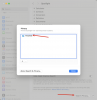
I think that is very unlikely.This problem may come from Spotlight on the Mac indexing everything on the Virtual Machine for search purposes. I always put the Parallels folder in the list of folders to not be indexed by Spotlight.
View attachment 23707
Inidicating the `Parallels` folder would at most cause a Sportlight process under Mac OS to consume CPU time. But not the Windows VM process.
Thank you for your answer. I did the setting, but it does not change.This problem may come from Spotlight on the Mac indexing everything on the Virtual Machine for search purposes. I always put the Parallels folder in the list of folders to not be indexed by Spotlight.
View attachment 23707
Attachments
Thank you for your answer. I checked Task manager on Windows. There was no process which uses much of CPU.Have you checked with the windows task manager if there's any process using significant cpu?
I've exactly the same issue with parallels using around 400% cpu on macOS, while the windows task manager lists the idle task at 98%, but still shows around 50% cpu usage.
Updating Windows to Windows 11 24H2 solved the problem for me. (See https://forum.parallels.com/threads/update-windows-to-24h2-on-arm.364414/)
This just started for me recently. Don't remember any changes other than installing the latest parallels update and tools. Laptop has never been this hot and the battery lasts about an hour and half. It used to last all day running two windows 11 VMs. The drop down never updates to show what's using resources.
Attachments

DharmendraL
Bit poster
Updating Windows to Windows 11 24H2 solved the problem for me. (See https://forum.parallels.com/threads/update-windows-to-24h2-on-arm.364414/)
This worked for me too. On battery for 3.5 hours now and batt still at 97%.