Error No Harddisk Converting Virtual Box VM to Parallels

pcpro178

Bit poster
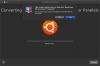
I tried following the steps in this knowledge base, but when I open the .vbox file it gives me an error that there is no disk image.
https://kb.parallels.com/122851
upload_2022-4-1_11-35-25.png
I'm running Virtual Box 6.1 and Parallels Desktop 16 or Mac. Host OS is Catalina 10.15.7 and guest is Ubuntu 18.04.
Any ideas?
 
Hello pcpro178, Please refer to the knowledge base article to Converting Virtual Box virtual machine to Parallels Desktop. Thanks.
 
My virtual machine was neither running, suspended or hibernated. It was fully shut down when I attempted to migrate it. The error I get, "This virtual machine has no hard disk," is not shown in the knowledge base article that you referenced.
 
I converted the VirtualBox VM to OVA format and then used ovftool to convert it to a VMWare VM. I got the same error when I tried to import that into Parallels.
 
I was able to use the command line to convert a virtual box VDI image (https://kb.parallels.com/112419). Although the article mentions VMware specifically, it also works on VirtualBox disk images:
/Applications/Parallels\ Desktop.app/Contents/MacOS/prl_convert /path/to/virtualbox/virtualmachine/disk.vdi --no-src-check --no-reconfig
 
I had a similar problem trying to import a VirtualBox VM into Parallels Desktop 19 (Pro Edition).
First, I tried using the "Open" menu from PD Control Center and selecting the ".vbox" file, but nothing happened - the dialog closed, PD made no attempt to convert the VM and showed no error. Then I tried it again selecting the ".vdi" file, again nothing happened.
Next I tried selecting "New" from the PD Control Center and clicking the "Open" button on the lower left corner. Selecting the ".vbox" file and trying to convert produced the error message "This virtual machine has no hard disk. Would you like to convert it anyway?" I chose No.
What DID work was doing the same step above that gave the no hard disk error but selecting the ".vdi" file instead. It converted the VM and added it to Control Center as expected.

Pretty sloppy work Parallels.
 
Back
Top