
I am still using the SCCM "Packages" deployment option in many cases because it allows for unattended installs which is very important in a few of our scenarios. However we also have scenarios where we want users to be able to install software, and therefor are using the Parallels Application Portal which requires the use of "Applications" as the deployment type.
So we are frequently needing to create both "Packages" and "Applications" for the same software to fullfil the different scenarios and this is a real pain. We would love to stop using Packages and just use Applications.
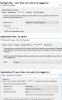
The kicker is that if you look at the image you will see that Applications allow for unattended installs on the PCs -- so the technology is built in to SCCM. Is there some way that Applications could have this fairly basic functionality that Packages have with Macs and that Applications have with PCs??
This is my main problem I am having with PMM, which otherwise I think is awesome!
Don Duff-McCracken
University of Waterloo
So we are frequently needing to create both "Packages" and "Applications" for the same software to fullfil the different scenarios and this is a real pain. We would love to stop using Packages and just use Applications.
The kicker is that if you look at the image you will see that Applications allow for unattended installs on the PCs -- so the technology is built in to SCCM. Is there some way that Applications could have this fairly basic functionality that Packages have with Macs and that Applications have with PCs??
This is my main problem I am having with PMM, which otherwise I think is awesome!
Don Duff-McCracken
University of Waterloo
