
Install the app
How to install the app on iOS
Follow along with the video below to see how to install our site as a web app on your home screen.
Note: This feature may not be available in some browsers.
You are using an out of date browser. It may not display this or other websites correctly.
You should upgrade or use an alternative browser.
You should upgrade or use an alternative browser.
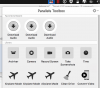
The report ID is 209813665Could you please post report ID here?
Thank you for sharing report ID. We will try to avoid possibility of a tools duplication in next versions.
Right now I can recommend you to perform next steps:
1. Quit from Parallels Toolbox
2. Run in terminal next command: rm -rf ~/Library/Application\ Support/com.parallels.toolbox
Be sure to copy and paste it saving all symbols in the command.
3. Run Parallels Toolbox again.
Right now I can recommend you to perform next steps:
1. Quit from Parallels Toolbox
2. Run in terminal next command: rm -rf ~/Library/Application\ Support/com.parallels.toolbox
Be sure to copy and paste it saving all symbols in the command.
3. Run Parallels Toolbox again.
That got rid of most of the duplicates. Convert Video, Launch, Download Audio and Download Video are still left as duplicates. I ran the Terminal command a second time and the duplicates are still there.Thank you for sharing report ID. We will try to avoid possibility of a tools duplication in next versions.
Right now I can recommend you to perform next steps:
1. Quit from Parallels Toolbox
2. Run in terminal next command: rm -rf ~/Library/Application\ Support/com.parallels.toolbox
Be sure to copy and paste it saving all symbols in the command.
3. Run Parallels Toolbox again.
I restarted, ran the command again, duplicates are still there.
Report ID: 209964920Send please report again.
Thank you again.
I am not sure if it will help, but you can try to perform next steps:
1. Quit from Parallels Toolbox
2. Run in terminal next command: rm -rf ~/Library/Application\ Support/com.parallels.toolbox
3. Run in terminal one more command: defaults delete com.parallels.toolbox ToolsList
4. Reboot your Mac
Give us know if it helps.
Anyway, we will try to prevent such problems in next releases.
I am not sure if it will help, but you can try to perform next steps:
1. Quit from Parallels Toolbox
2. Run in terminal next command: rm -rf ~/Library/Application\ Support/com.parallels.toolbox
3. Run in terminal one more command: defaults delete com.parallels.toolbox ToolsList
4. Reboot your Mac
Give us know if it helps.
Anyway, we will try to prevent such problems in next releases.
Thank you again.
I am not sure if it will help, but you can try to perform next steps:
1. Quit from Parallels Toolbox
2. Run in terminal next command: rm -rf ~/Library/Application\ Support/com.parallels.toolbox
3. Run in terminal one more command: defaults delete com.parallels.toolbox ToolsList
4. Reboot your Mac
Give us know if it helps.
Anyway, we will try to prevent such problems in next releases.
Yay! That worked! Thanks.
Arun@Parallels
Parallels Support
In my case, the Terminal Commands posted did not work...but this is how I got rid of the Duplicate Apps in my Parallels Toolbox Window...
I opened my "Trash Can", then I "Left Clicked" the Parallels Toolbox so that all of the Apps are showing and I Selected and Dragged the duplicate apps into the open Trash Can window, one by one...
As I did, the Duplicate Apps were no longer in the Parallels Toolbox window...
I then Emptied my Trash Can and restarted and powered down/up my iMac several times to make sure that the duplicate apps were in fact gone...as well as selecting each of the apps that had duplicates, just to make sure that they still worked...which they all did...
So, in my case, all is well now...
JFYI;
I am running Parallels Toolbox Version 2.0.2 (1213) and macOS High Sierra Version 10.13
I opened my "Trash Can", then I "Left Clicked" the Parallels Toolbox so that all of the Apps are showing and I Selected and Dragged the duplicate apps into the open Trash Can window, one by one...
As I did, the Duplicate Apps were no longer in the Parallels Toolbox window...
I then Emptied my Trash Can and restarted and powered down/up my iMac several times to make sure that the duplicate apps were in fact gone...as well as selecting each of the apps that had duplicates, just to make sure that they still worked...which they all did...
So, in my case, all is well now...
JFYI;
I am running Parallels Toolbox Version 2.0.2 (1213) and macOS High Sierra Version 10.13
Last edited:

sergk
Parallels Developers
cvvmax, thanks for advise.I then Emptied my Trash
Yes duplicate icons in Toolbox Window can caused by duplicates of tools bundles. Finding and removing them can resolve the problem.