Documents will not print with Parallels 12

  • Thread starter Thread starter Parallels User
  • Start date Start date
Printing lock up ? Noticed if i print an email from Outlook 2013 on version 12 it open adobe reader but the print dialogue box opens behind all the open windows and you cannot tab or access it, until its OK'ed you can't access any screens under Windows and need to crash windows.
Mac stays operational. running Win 8.1
 
Printing lock up ? Noticed if i print an email from Outlook 2013 on version 12 it open adobe reader but the print dialogue box opens behind all the open windows and you cannot tab or access it, until its OK'ed you can't access any screens under Windows and need to crash windows.
Mac stays operational. running Win 8.1

If possible share a screenshot to check and assist.
 
Hi!

I use parallels 12.1.1(41491) and win7, I have this message: "There was an internal error and Parallels Desktop is unable to print this document"".
I unchecked Shared Printers and make sure the "show page setup options before printing" . Then it works, but i want to print to pdf from win.
What is my problem? An other macmini it is work, but on my new MacbookPro is doesn't.
Thank you
 
Hello,

I have the same problem. Do you have any solution to solve this? I can print only without configuration window, but this way of printing is unusable after a while (temporary it is ok).
Report ID is: 144231897

Thanks,
Janos
 
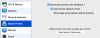
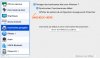
as suggested in this thread, uncheck "show page setup options before printing" under shared printers. See the screenshot (with a french version). It will (normally) work again but the problem is, as written, that you can't setup the options of your printer anymore. We're all expecting a fix for this...
Niko
 

Attachments

  • parallels_uncheck.jpg
    parallels_uncheck.jpg
    79.2 KB · Views: 5
Hi everyone
upgraded today..check the option for printing again and try.... suspens..
yesss.. it works now ! Welcome back to this functionality !
Niko
 
Hi everyone
upgraded today..check the option for printing again and try.... suspens..
yesss.. it works now ! Welcome back to this functionality !
Niko
We are happy to hear that the issue with printing is resolved. Feel free to reach us anytime for support.
 
Hi. I have Parallel 13.3.0 and does not print. When unchecked "Show page .." it prints, but with zero length.
It worked fine in Parallel 11.
 
Hi. I have Parallel 13.3.0 and does not print. When unchecked "Show page .." it prints, but with zero length.
It worked fine in Parallel 11.
Hello dife, Let us ensure that Parallels Tools are properly installed. Please follow this link to install Parallels Tools. If you see reinstall or update Parallels Tools then kindly reinstall it.
 
Thanks for the suggestion. I have the latest version of Parallel (build 43321)
Despite I have updated Parallel Tools, I have reinstalled right now.
Prints nothing. I have tested with real printer (Job stopped, most probably, because empty)
With PDF printer (ie. printing into pdf) results in zero length file.
I tried Win10, Win7, WinXP, non of them works in 13.3
 
Last edited:
Thanks for the suggestion. I have the latest version of Parallel (build 43321)
Despite I have updated Parallel Tools, I have reinstalled right now.
Prints nothing. I have tested with real printer (Job stopped, most probably, because empty)
With PDF printer (ie. printing into pdf) results in zero length file.
I tried Win10, Win7, WinXP, non of them works in 13.3
Kindly follow the instructions from this link < https://kb.parallels.com/en/111997 > and check if it helps.
 
Kindly follow the instructions from this link < https://kb.parallels.com/en/111997 > and check if it helps.
This link is about installing/sharing MacOS printer with VM via Parallel.
It is done. The VM know the printer even the default one.
The printing process starts (only with unchecked the "Show page setup option before printing")
The Printer on the Dock of MAC appears, pdf file is created, BUT with zero length.
When I choose real printer, the process is the same, nothing is printed.
BTW, I have been using Parallel since 3.x, in the last 10 years there was no problem with printing .
 
This link is about installing/sharing MacOS printer with VM via Parallel.
It is done. The VM know the printer even the default one.
The printing process starts (only with unchecked the "Show page setup option before printing")
The Printer on the Dock of MAC appears, pdf file is created, BUT with zero length.
When I choose real printer, the process is the same, nothing is printed.
BTW, I have been using Parallel since 3.x, in the last 10 years there was no problem with printing .
Let us know how the printer is connected to the Mac and VM.
 
This is the MAC printer preferences: These work fine from MAC
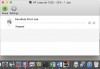
Next screenshot about printers in Windows 7. When I start printing test page, it starts printing as you can see on the 3rd picture. However, the saved pdf is empty.
I also uploaded the printer sharing setup in Parallels.
 

Attachments

  • Screen Shot 2018-04-28 at 14.00.00.png
    Screen Shot 2018-04-28 at 14.00.00.png
    127.9 KB · Views: 1
  • Screen Shot 2018-04-28 at 14.03.30.png
    Screen Shot 2018-04-28 at 14.03.30.png
    111 KB · Views: 1
  • pints.png
    pints.png
    27.7 KB · Views: 1
  • Screen Shot 2018-04-28 at 14.23.29.png
    Screen Shot 2018-04-28 at 14.23.29.png
    154.7 KB · Views: 1
Hi dife,
Are you trying to use the Vip PDF Printer and it is not working? Have you tried with the other printers to print? Is it printing?
 
When printing to real printer, this is the result. From MAC it prints correctly, but from Parallels empty page is received ..
 

Attachments

  • print2.png
    print2.png
    163.7 KB · Views: 2
Back
Top