
Install the app
How to install the app on iOS
Follow along with the video below to see how to install our site as a web app on your home screen.
Note: This feature may not be available in some browsers.
You are using an out of date browser. It may not display this or other websites correctly.
You should upgrade or use an alternative browser.
You should upgrade or use an alternative browser.
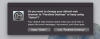
Do you want to change your default web browser to "Parallels Desktop" or Keep using "Safari"
- Thread starter MikeH3
- Start date
Arun@Parallels
Parallels Support
Hi @MikeH3 , please try to uninstall Parallels Desktop and check if that works.
How can i resolve this. starting to drive me crazy. i don't want to lose all my virtual machines and work.

Hemnath@Parallels
Parallels Support
Please shut Windows down, open the virtual machine configuration window, navigate to Options -> Web & Email and select 'Default' for both 'Web pages' and 'Email'. Close this window now. Next, navigate to Apple Icon -> System Preferences... -> General and set 'Default web browser:' to 'Safari'. Close this window now and see if the issue re-occurs.How can i resolve this. starting to drive me crazy. i don't want to lose all my virtual machines and work.
Hemnath@Parallels
Parallels Support
That's great! You are welcome. Please reach out again for any further queries.YES! that corrected the issue. You rock thanks!
I believe it was setting the VM configured for "default" that made the difference.