
Hello. My .pvm file for a Windows VM in Mac takes way more space than the Windows disks. I checked the .hdd and .hds files in details, and they take more space than the space taken in Windows VM. All disks are like that, but I will take one as an example that the difference is significant.
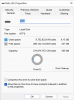
The Windows disk takes only 8GB. Take a look at the D: drive properties screenshot:
But then when I see the files in Mac (show package contents for .pvm then for the .hdd), this is the space it takes:

Note how the .hds file takes 50 GB. It's taking way more space. Why is this happening? I have already tried the following:
1. I tried cleaned up disk in Windows
2. Tried to Analyze/Optimize disk in Windows with defragmenter.
3. SmartGuard is disabled and all snapshots are deleted.
4. Parallels say there is no disk space to be reclaimed
5. I tried to run the following command in Terminal:
prl_disk_tool merge --hdd /Users/wagner/Parallels/Windows\ 11.pvm/Windows\ 11-0.hdd
Nothing works. Parallels still takes 50 GB in disk space for a VM disk that has only 8GB of data. The other two disks are the same, but they take "only" around 20GB data more than the actual Windows size. In summary I'm losing 100 GB disk space here.
What can I do to reclaim such disk space?
Thank you.
The Windows disk takes only 8GB. Take a look at the D: drive properties screenshot:
But then when I see the files in Mac (show package contents for .pvm then for the .hdd), this is the space it takes:
Note how the .hds file takes 50 GB. It's taking way more space. Why is this happening? I have already tried the following:
1. I tried cleaned up disk in Windows
2. Tried to Analyze/Optimize disk in Windows with defragmenter.
3. SmartGuard is disabled and all snapshots are deleted.
4. Parallels say there is no disk space to be reclaimed
5. I tried to run the following command in Terminal:
prl_disk_tool merge --hdd /Users/wagner/Parallels/Windows\ 11.pvm/Windows\ 11-0.hdd
Nothing works. Parallels still takes 50 GB in disk space for a VM disk that has only 8GB of data. The other two disks are the same, but they take "only" around 20GB data more than the actual Windows size. In summary I'm losing 100 GB disk space here.
What can I do to reclaim such disk space?
Thank you.

