Disable right click via CTRL+click in Parallels Desktop 13?

ChristianT2

Bit poster
I often select multiple files in my Linux VMs by clicking on them while holding down CTRL. Similarly, I often open links in new tabs in Firefox by holding down CTRL while clicking on them. I am sure there are many more scenarios in which a user is required to hold down CTRL while clicking in order to do something.

Unfortunately, I couldn't find a way to prevent Parallels Desktop from treating CTRL+click as a right click in a VM. I was able to disable the other macOS system shortcuts (like CTRL+arrow keys for Mission Control, etc.) by setting "send macOS system shortcuts" to "Always".
So, is there a way to prevent Parallels Desktop from treating CTRL+click as a right click within a VM?

Please note that I'm not looking for some dirty hacks like disabling my CTRL key or remapping it via some third party tools on macOS. I never had this problem with other virtualization solutions like VMware Fusion and even VirtualBox - therefore I obviously expect Parallels Desktop to also not have any problems with it.

Summary (File Browser - Multiple Selection Scenario):
  • What happens:
  1. Open file browser on Linux VM (e.g. Nautilus in Ubuntu)
  2. Select file or folder so it gets highlighted
  3. Hold down CTRL while clicking on another file or folder
  4. A context menu appears because CTRL+click is treated as a right click
  • What should happen: After 3.: The other file also gets selected and therefore highlighted (no context menu appears because the user's action is NOT a right click!)
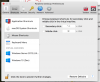
 
you have to go into parallels preferences (not in the vm configuration). select shortcuts and open the mouse shortcuts item.

there you'll see a "Secondary Click" option. uncheck it and PD will just pass control+click along as a regular control+click instead of a right-click.

note: this affects all your PD VMs... there's no way i know of to do it on a per-VM basis.
 

Attachments

  • Screen Shot 2017-11-02 at 4.20.16 PM.png
    Screen Shot 2017-11-02 at 4.20.16 PM.png
    270.1 KB · Views: 41
you have to go into parallels preferences (not in the vm configuration). select shortcuts and open the mouse shortcuts item.

there you'll see a "Secondary Click" option. uncheck it and PD will just pass control+click along as a regular control+click instead of a right-click.

note: this affects all your PD VMs... there's no way i know of to do it on a per-VM basis.
Thank you for your help. Unfortunately, this solution doesn't work for me - neither in Linux nor in Windows.
Does it work for you? Are you already on High Sierra? Using PD 13?
 
Also not working here - annoying bug??

System: macbook pro 2016, High Sierra, Parallels Desktop 13 latest update, Windows 10
 
Also not working here - annoying bug??

System: macbook pro 2016, High Sierra, Parallels Desktop 13 latest update, Windows 10
Hi @TorstenB4, have you tried with Shift or Functions + Ctrl + click? If the issue persists, please make a report about the problem and send it to Parallels.
Go to Menu->Help->Send Technical Data and if it possible, write the report number here.
 
I was experiencing this same problem, and I finally tracked it down to BetterTouchTool and Karabiner-Elements. Disabling these 3rd party utilities enabled me to use Ctrl-Click in the guest OS. I'm not planning to quit using Parallels or BTT so it would be nice to figure out a work-around that allowed both to play well together.
 
I was experiencing this same problem, and I finally tracked it down to BetterTouchTool and Karabiner-Elements. Disabling these 3rd party utilities enabled me to use Ctrl-Click in the guest OS. I'm not planning to quit using Parallels or BTT so it would be nice to figure out a work-around that allowed both to play well together.
Hi @TanD, thanks for the workaround to enable right click via CTRL+click in Parallels Desktop 13 for Mac. It's very much helpful for us to report this to our engineering team!
 
Also not working here - annoying bug??

System: macbook pro 2016, High Sierra, Parallels Desktop 13 latest update, Windows 10
Hi, have you installed BetterTouchTool and Karabiner-Elements applications in the Windows virtual machine environment? You may take a snapshot and then try uninstall those applications to check if you are able to enable right click via CTRL+click in Parallels Desktop 13?
 
I was experiencing this same problem, and I finally tracked it down to BetterTouchTool and Karabiner-Elements. Disabling these 3rd party utilities enabled me to use Ctrl-Click in the guest OS. I'm not planning to quit using Parallels or BTT so it would be nice to figure out a work-around that allowed both to play well together.

This discovery was really helpful to me. I would add that you have an option to disable BTT for a specific application. You add Parallels as an application to the BTT app list and then there is a drop down with options including disable BTT. Once I did that, the Parallels right click now works. HTH.

*edit* The above fix (disabling in BTT) is not working reliably for me. I have added the Parallels Win 10 dock helper and also the specific app involved in hopes it works better but not yet sure. May not be as useful a workaround as I had hoped.
 
Last edited:
Thank you for your insights. A slight change in BTT's configuration - different from the one which George described - solved the problem for me:
BTT > Advanced Settings > General > General Stuff > Disable Better Touch Tool while holding: [x] ^ (ctrl)
 
Thank you for your insights. A slight change in BTT's configuration - different from the one which George described - solved the problem for me:
BTT > Advanced Settings > General > General Stuff > Disable Better Touch Tool while holding: [x] ^ (ctrl)
We are happy to hear that the issue is resolved. Let us know if you have any questions.
 
I'm having the same issue of ctrl-click acting as a right click. I disabled secondary click in Parallels Desktop settings. That was set to ctrl-shift-click anyway, so I don't think that was the problem in the first place. I don't have any third party applications that change input/mouse/keyboard settings
 
I'm having the same issue of ctrl-click acting as a right click. I disabled secondary click in Parallels Desktop settings. That was set to ctrl-shift-click anyway, so I don't think that was the problem in the first place. I don't have any third party applications that change input/mouse/keyboard settings
same issue here!
 
Back
Top