Disable Apple -> Win Key

Tried that myself, and it doesn't seem to help. No matter what I do, hitting the Command key acts like the Win key and opens the start menu.

I've made sure I was clearing the Cmd - Win checkbox in the correct profile too...still doesn't disable that keypress.
 
This has been going on for 2 years and possibly more. I am running Parallels 6 in November 2010 and am having the same problem. It is very annoying. If they check boxes are there to turn the mapping off, they should work.
 
I have this exact problem. I even went into Windows Explorer user configuration and told explorer to disable Windows+X hotkeys.

I have the shortcuts disables in parallels and in windows itself but these god damned shortcuts keep working.
 
keyboard config still doesn't work right

Parallels v 6.0.11994
Feb 17, 2011

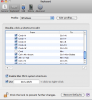
Uncheck Cmd => Win
Click on a Windows app
Press the Cmd key
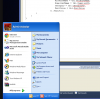
Windows menu pops up

Attached screenshots of the preferences for keyboard mapping
and a screen shot after pressing the cmd key (real dramatic)
 

Attachments

  • Screen shot 2011-07-26 at 2.48.38 PM.png
    Screen shot 2011-07-26 at 2.48.38 PM.png
    72.4 KB · Views: 9
  • Screen shot 2011-07-26 at 2.49.02 PM.png
    Screen shot 2011-07-26 at 2.49.02 PM.png
    111.2 KB · Views: 6
Back
Top