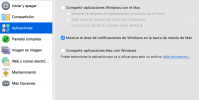
I have a M5 Pro Macbook Pro, with Parallels 27 and a single one Windows 11 virtual machine. I have disable "Share Windows applications on Mac" and on Spoylight all windows apps are shown.
There is a way to hide all Windows apps on my Mac? I've try to check and uncheck the property, restart the computer, and nothing works.
(Screenshots are in spanish, but is easy to recognize the windows apps icons)
Thank you very much!
There is a way to hide all Windows apps on my Mac? I've try to check and uncheck the property, restart the computer, and nothing works.
(Screenshots are in spanish, but is easy to recognize the windows apps icons)
Thank you very much!