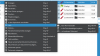
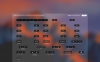
Parallels desktop 13 supports the touch bar on latest MacBook Pro. The displayed items are customizable for each single program, but the available functions are predefined, see attached screenshot.
1. It would be useful, if the user could define own keystroke combinations (e.g. Ctrl + Alt + F) for quick access on the touch bar.
2. This includes customizable labels. I would appreciate, if I could read "Refresh" or an icon on the touch bar instead of "F5".
Current limited options:
1. It would be useful, if the user could define own keystroke combinations (e.g. Ctrl + Alt + F) for quick access on the touch bar.
2. This includes customizable labels. I would appreciate, if I could read "Refresh" or an icon on the touch bar instead of "F5".
Current limited options: