
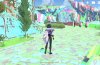
Could you tell me, please how to fix texture glitches in the game? When I'm playing there is a multicolored texture glitches and I don't know how to fix this. I saw a solution to a similar problem with the other games, here it is: "You should paste the following text in the "Boot flags" field in the settings: "video.untrimmed_dynamic_cbuffers=1". I tried and it didn't help. I set right settings (Enable nested virtualization and auto settings in "CPU and Memory", optimized the application for games) in "Parallels Desktop" and it didn't help. I tried to change game setting but even this didn't help. I would be very grateful if you help me with this problem.
My computer: iMac (21.5 - inch, Late 2013) Processor: 2,9 GHz quad-core processor Intel Core i5; Graphics: NVIDIA GeForce GT 750M 1 GB
(I have the latest update)
"Parallels Desktop" version: 16.5.0
Name of the game: "Genshin Impact"
My computer: iMac (21.5 - inch, Late 2013) Processor: 2,9 GHz quad-core processor Intel Core i5; Graphics: NVIDIA GeForce GT 750M 1 GB
(I have the latest update)
"Parallels Desktop" version: 16.5.0
Name of the game: "Genshin Impact"