
Install the app
How to install the app on iOS
Follow along with the video below to see how to install our site as a web app on your home screen.
Note: This feature may not be available in some browsers.
You are using an out of date browser. It may not display this or other websites correctly.
You should upgrade or use an alternative browser.
You should upgrade or use an alternative browser.
Configuration option to disable auto-pausing in PD13 disappeared
- Thread starter Rainer1
- Start date
-
- Tags
- configuration
Alfena@Parallels
Pro
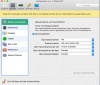

Hi @Rainer1, please let us know the guest operating system and we can help!There is no checkbox to control the Pause behavior. This tab only offers a radio list, see attachment.Actually I searched all tabs for the setting, but did not find one.
Arun@Parallels
Parallels Support
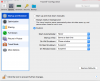
I thashed PD13 and installed v13.1.1 again, but it did not make the option appear.
Please take a screenshot of it and reply with the same. Thanks!
Alfena@Parallels
Pro
Hello @Ozy, please refer http://kb.parallels.com/6860 to disable Windows from pausing automatically.
Thanks
Thanks
I had a support session with Parallels, and they confirmed that there is not option to turn off auto-pausing for OSX guests. It has been reported to development.
It would be nice if Parallels would be open about their backlog and tentative schedule for bug fixes, like Jetbrains does it. I feel left in the dark if Parallels is just ignoring OSX guest support, or if the solution is just around the corner.
It would be nice if Parallels would be open about their backlog and tentative schedule for bug fixes, like Jetbrains does it. I feel left in the dark if Parallels is just ignoring OSX guest support, or if the solution is just around the corner.
Agreed, considering most of us are paying a subscription, we could really use some insight of what our money is paying for. Support doesn't seem to be one of them.I had a support session with Parallels, and they confirmed that there is not option to turn off auto-pausing for OSX guests. It has been reported to development.
It would be nice if Parallels would be open about their backlog and tentative schedule for bug fixes, like Jetbrains does it. I feel left in the dark if Parallels is just ignoring OSX guest support, or if the solution is just around the corner.
Kent_Boortz
Junior Member
This is a showstopper for me as I'm connecting to VPN in the guest OS. When Parallels pauses it causes the VPN connection to be terminated. I then not only have to log in again to macOS but also have to log in to VPN again.
S
Sathiya@Parallels
Hi EduardoM. macOS VM will pause according to guest System Preferences>Energy Saver>Computer Sleep. Go to System Preferences > Energy Saver and move all sliders to the right and disable put hard disk to sleep when possible so that the virtual machine will not enter sleep mode or pause automatically.So, just to confirm, there's no way to stop Parallels from pausing a macOS guest when I go to the Login Window in my Mac?
It would be nice to have this information noted in the knowledgebase article: http://kb.parallels.com/6860 and that it applies to Mac OS or provide this in a separate article.Hi EduardoM. macOS VM will pause according to guest System Preferences>Energy Saver>Computer Sleep. Go to System Preferences > Energy Saver and move all sliders to the right and disable put hard disk to sleep when possible so that the virtual machine will not enter sleep mode or pause automatically.

Hemnath@Parallels
Parallels Support
Hello Chey. Have we noted the fact that http://kb.parallels.com/6860 is about making a VM pause automatically whereas this thread is about preventing the same?It would be nice to have this information noted in the knowledgebase article: http://kb.parallels.com/6860 and that it applies to Mac OS or provide this in a separate article.
Last edited: