Hey,
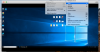
I was running out of space on my Mac's internal drive so I decided to move my .pvm file to an external SSD. (Samsung T5 3.1) I followed the steps to move the file to the external drive from the parallel site. The VM is working fine running on the VM. Only issue I have is that I can't enter coherence mode. I have reinstalled the parallels tools multiple times. The original VM running on the internal drive coherence mode works just fine.
Is it expected behavior that a VM running on a external drive can't run in coherence mode? Or is this a bug or defect?
Thanks
Patrick
I was running out of space on my Mac's internal drive so I decided to move my .pvm file to an external SSD. (Samsung T5 3.1) I followed the steps to move the file to the external drive from the parallel site. The VM is working fine running on the VM. Only issue I have is that I can't enter coherence mode. I have reinstalled the parallels tools multiple times. The original VM running on the internal drive coherence mode works just fine.
Is it expected behavior that a VM running on a external drive can't run in coherence mode? Or is this a bug or defect?
Thanks
Patrick