Coherence Mode Not Available - Parallels Tools don't install

JiriK3

Bit poster
Host machine: M2 Mac, macOS 13.6
Virtual machine: macOS 13.6

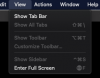
Despite installing Parallels tools "successfully", I don't get the option to enter coherence mode. Instead, the option isn't even listed, seemingly because Parallels Tools has, in fact, NOT been successfully installed. I tried this on two separate, clean virtual machines. Am I missing something? Is this a known bug? Is there any solution or workaround?
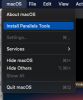
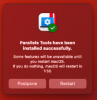
Screenshot 2025-01-01 at 15.23.01.png Screenshot 2025-01-01 at 15.23.21.png Screenshot 2025-01-01 at 15.26.50.png
 
- Tried to reinstall Parallels Tools multiple times (even manually through the installer)
- There are no pending permissions or extensions related to Parallels in Security & Privacy on the virtual machine
- The virtual machine's OS is the one Parallels itself downloaded for me
- Parallels is licensed, activated, and fully updated
- Installing parallels tools on a FRESH macOS installation didn't work either
 
- Upgraded to macOS 15.2, on both the host and the virtual machine, with the same result. Something is seriously wrong with Parallels 20.

UPDATE:
I found this thread which states that Coherence Mode is not available if you run 'guest' machines with macOS on them on Apple sillicon... If a cornerstone feature is not available on newest Apple hardware, in any combination of host - guest operatin systems, at least have the common decency and courtesy to state so in your marketing materials headlining said feature, otherwise your customers might feel deceived.
 
Parallels Desktop 20: 'Ready and Optimized for macOS Sequoia'- just not ready to tell you Coherence Mode took a hike in the woods!
 
Back
Top