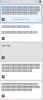
When I'm copying stuff from VS Code - Clipboard history is showing "square" placeholders -> see screenshot.
My guess is that it's not using / has access to system font I'm using ( I'm using one of the Iosevka variations -GitHub . It's OSS font for coding/terminal)
I don't see an option to set font in Parallels toolsbox either.
It's annoying -because I can't see what I'm copying - I have to guess which clipboard thing is what.

My guess is that it's not using / has access to system font I'm using ( I'm using one of the Iosevka variations -GitHub . It's OSS font for coding/terminal)
I don't see an option to set font in Parallels toolsbox either.
It's annoying -because I can't see what I'm copying - I have to guess which clipboard thing is what.