
Install the app
How to install the app on iOS
Follow along with the video below to see how to install our site as a web app on your home screen.
Note: This feature may not be available in some browsers.
You are using an out of date browser. It may not display this or other websites correctly.
You should upgrade or use an alternative browser.
You should upgrade or use an alternative browser.
Clipboard History taking 99% of CPU and not responding
- Thread starter stingerpl
- Start date
 On startup it takes 99% of CPU and becomes unresponsive.

sergk
Parallels Developers
Hello,
the reason of such CPU consumption could be a incorrect handling of huge data appeared in clipboard.
Try do the next:
- Terminate "Clipboard History" from "Activity Monitor" application;
- Open "~/Library/Application Support/ClipboardHistory" folder in Finder. To quick open switch to Finder, press Cmd+Shift+G and paste "~/Library/Application Support/ClipboardHistory" into appeared window;
- You will see new Finder window with content like in attached window;
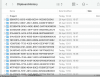
- Find folder (or folders) with maximum size (it should be some megabytes or larger, I suppose). It's size should be significantly larger that size of other folders.
- Remove this folder (or folders). You can also remove all folders here but you will lose all clipboard history in this case;
- Launch Clipboard History again;
the reason of such CPU consumption could be a incorrect handling of huge data appeared in clipboard.
Try do the next:
- Terminate "Clipboard History" from "Activity Monitor" application;
- Open "~/Library/Application Support/ClipboardHistory" folder in Finder. To quick open switch to Finder, press Cmd+Shift+G and paste "~/Library/Application Support/ClipboardHistory" into appeared window;
- You will see new Finder window with content like in attached window;
- Find folder (or folders) with maximum size (it should be some megabytes or larger, I suppose). It's size should be significantly larger that size of other folders.
- Remove this folder (or folders). You can also remove all folders here but you will lose all clipboard history in this case;
- Launch Clipboard History again;
Thanks for your support! This helps a lot.
Seems like a had a lot of large dirs:
116M D6414779-296D-4615-92FA-A103B0DECA6E
152M 85EFF9E7-27B3-4F29-890B-E2C156CF4E17
152M E85E99A3-CC0F-463D-B75D-B7D32D31E800
197M 13610060-F3ED-4E3F-AC9C-9154315472C7
417M 1E5B52D5-265C-4C55-8D31-E1FD7A336D45
423M 005307FC-939F-4327-9599-4F71320C106E
May I suggest a setting for not saving clipboard items larger than X ?
Thanks again!
Seems like a had a lot of large dirs:
116M D6414779-296D-4615-92FA-A103B0DECA6E
152M 85EFF9E7-27B3-4F29-890B-E2C156CF4E17
152M E85E99A3-CC0F-463D-B75D-B7D32D31E800
197M 13610060-F3ED-4E3F-AC9C-9154315472C7
417M 1E5B52D5-265C-4C55-8D31-E1FD7A336D45
423M 005307FC-939F-4327-9599-4F71320C106E
May I suggest a setting for not saving clipboard items larger than X ?
Thanks again!
Hello,
the reason of such CPU consumption could be a incorrect handling of huge data appeared in clipboard.
Try do the next:
- Terminate "Clipboard History" from "Activity Monitor" application;
- Open "~/Library/Application Support/ClipboardHistory" folder in Finder. To quick open switch to Finder, press Cmd+Shift+G and paste "~/Library/Application Support/ClipboardHistory" into appeared window;
- You will see new Finder window with content like in attached window;
View attachment 17714
- Find folder (or folders) with maximum size (it should be some megabytes or larger, I suppose). It's size should be significantly larger that size of other folders.
- Remove this folder (or folders). You can also remove all folders here but you will lose all clipboard history in this case;
- Launch Clipboard History again;
sergk
Parallels Developers
> Thanks for your support! This helps a lot.
Did Clipboard History stop eating CPU?
> May I suggest a setting for not saving clipboard items larger than X ?
The problem could be related not only to size of data but also to type of data. If you haven't emptied the Trash could you compress one (or all) of removed folders and share it with us using any file sharing service? It will help us to understand what really happened.
Did Clipboard History stop eating CPU?
> May I suggest a setting for not saving clipboard items larger than X ?
The problem could be related not only to size of data but also to type of data. If you haven't emptied the Trash could you compress one (or all) of removed folders and share it with us using any file sharing service? It will help us to understand what really happened.