
Hans Baumeister
Bit poster
After upgrading my Mojave system to Catalina, Parallels failed to start. It just got stuck on the "Starting..." dialog.
So I uninstalled it completely and reinstalled.
Lo and behold, the issue was clearly that the on-Mojave installation didn't have access to some folders (Desktop, Documents, Downloads) - something the installation then asked for. BUT: the request to access the Downloads folder failed. It just got stuck - see screenshot:
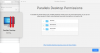
I hit "Finish" anyway and Parallels started just fine.
I then checked my Privacy->Files and Folders settings:
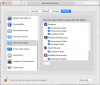
You can see that I've unlocked the pane - still, the +/- buttons are grayed out. I also can't select any application in this pane. It seems completely locked.
I'm running 10.15.6 - has anyone else seen this issue?
Not sure what the consequences of Parallels not having access to my Downloads folder are going to be - a Windows 10 VM seemed to run just fine.
So I uninstalled it completely and reinstalled.
Lo and behold, the issue was clearly that the on-Mojave installation didn't have access to some folders (Desktop, Documents, Downloads) - something the installation then asked for. BUT: the request to access the Downloads folder failed. It just got stuck - see screenshot:
I hit "Finish" anyway and Parallels started just fine.
I then checked my Privacy->Files and Folders settings:
You can see that I've unlocked the pane - still, the +/- buttons are grayed out. I also can't select any application in this pane. It seems completely locked.
I'm running 10.15.6 - has anyone else seen this issue?
Not sure what the consequences of Parallels not having access to my Downloads folder are going to be - a Windows 10 VM seemed to run just fine.