Using the latest Parallels Toolbox (3.0.0 - 2073) on macOS Mojave (10.14.1). All of the Capture tools can only save the capture to the clipboard. Even though I am able to select a different location (such as Desktop) in the preferences, this selection does not 'take'. Any help for this issue?

Install the app
How to install the app on iOS
Follow along with the video below to see how to install our site as a web app on your home screen.
Note: This feature may not be available in some browsers.
You are using an out of date browser. It may not display this or other websites correctly.
You should upgrade or use an alternative browser.
You should upgrade or use an alternative browser.
Capture tools can only save to clipboard
- Thread starter WilliamC7
- Start date

sergk
Parallels Developers
Hello,
Capturing tools on mac OS 10.14 and 10.15 use same 'Save to' option value as system utility to capture the screen. So if you change 'Save to' in system utility (Cmd + Shift + 5) then "Capture Screen" tool must show same value for 'Save to'. Can you confirm it for different values of 'Save to' (Desktop, Documents, Clipboard, Preview, custom folder)?
The fact that value of 'Save to' is reverted back after reopening tool's preferences shows that tool has no write access to these directories. While opening the preferences tool checks write access and if no then reverts value of option to first acceptable value (Clipboard).
Could you please check if these values of 'Save to' work or no: Preview, Mail, Messages. Write access is not needed for these values and should work. If they are work then the reason of your issue is in file access. If they are don't work then the reason in saving of parameters (as you supposed).
I think the curious thing is that the Parallels Capture tools can't maintain their own "Save to" settings. In other
words, when I change the "Save to" setting to say "Desktop", and then I click "Done", the change is not saved - because if I immediately check the setting again (even though I haven't even taken a screenshot yet) the "Save to" setting has reverted back to "Clipboard". No matter what I choose for the "Save to" setting, it always immediately reverts back to "Clipboard" as soon as you click "Done". Furthermore, if I choose "Other..." in the "Save to:" dropdown list and then I pick a folder from the resulting Finder window and then I click "Select", the "Save to:" option will be instantly reverted back to "Clipboard" even before pressing "Done".
Capturing tools on mac OS 10.14 and 10.15 use same 'Save to' option value as system utility to capture the screen. So if you change 'Save to' in system utility (Cmd + Shift + 5) then "Capture Screen" tool must show same value for 'Save to'. Can you confirm it for different values of 'Save to' (Desktop, Documents, Clipboard, Preview, custom folder)?
The fact that value of 'Save to' is reverted back after reopening tool's preferences shows that tool has no write access to these directories. While opening the preferences tool checks write access and if no then reverts value of option to first acceptable value (Clipboard).
Could you please check if these values of 'Save to' work or no: Preview, Mail, Messages. Write access is not needed for these values and should work. If they are work then the reason of your issue is in file access. If they are don't work then the reason in saving of parameters (as you supposed).
Hi sergk,
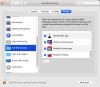
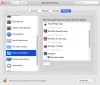
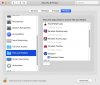
Ok, here are some screenshots that show that there is no correlation (at least on my system) between the system screenshot settings and the Parallels Toolbox Capture Tools settings. Note that I did close and then re-open the Parallels Capture Tools settings before each screenshot to ensure that any changes would be shown.
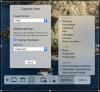
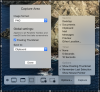
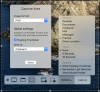
Ok, here are some screenshots that show that there is no correlation (at least on my system) between the system screenshot settings and the Parallels Toolbox Capture Tools settings. Note that I did close and then re-open the Parallels Capture Tools settings before each screenshot to ensure that any changes would be shown.
Hi Sergk,
I do have admin access, but I log in as a normal (non-admin) 99.999% of the time.
FYI...Thinking back on this issue: I have not always had this issue with the Parallels Capture Tools Settings - I used to be able to change the options without any problems. The first time I noticed this issue was when Apple introduced "Stacks" (circa Mojave). While it may be coincidental, the first time I noticed that I could no longer make changes to the Capture Tools' "Save to" settings was after I enabled the "Stacks" option on my desktop (e.g. right-click the desktop and select "Use Stacks".) However, after I noticed the issue with not being able to change the Capture Tools' "Save to" settings I tried disabling the "Stacks" option on my desktop and the "Save to" setting's functionality was not restored. So, I don't know if these two things are related, but I thought I would mention it in case it might help you in thinking about the issue.
I do have admin access, but I log in as a normal (non-admin) 99.999% of the time.
FYI...Thinking back on this issue: I have not always had this issue with the Parallels Capture Tools Settings - I used to be able to change the options without any problems. The first time I noticed this issue was when Apple introduced "Stacks" (circa Mojave). While it may be coincidental, the first time I noticed that I could no longer make changes to the Capture Tools' "Save to" settings was after I enabled the "Stacks" option on my desktop (e.g. right-click the desktop and select "Use Stacks".) However, after I noticed the issue with not being able to change the Capture Tools' "Save to" settings I tried disabling the "Stacks" option on my desktop and the "Save to" setting's functionality was not restored. So, I don't know if these two things are related, but I thought I would mention it in case it might help you in thinking about the issue.
sergk
Parallels Developers
Hello,
I don't think these issues are related.
The first time I noticed this issue was when Apple introduced "Stacks" (circa Mojave). While it may be coincidental, the first time I noticed that I could no longer make changes to the Capture Tools' "Save to" settings was after I enabled the "Stacks" option on my desktop (e.g. right-click the desktop and select "Use Stacks".) However, after I noticed the issue with not being able to change the Capture Tools' "Save to" settings I tried disabling the "Stacks" option on my desktop and the "Save to" setting's functionality was not restored. So, I don't know if these two things are related, but I thought I would mention it in case it might help you in thinking about the issue.
I don't think these issues are related.
Could you please try to use "Capture Area" tool from admin account? Does issue persist?I do have admin access, but I log in as a normal (non-admin) 99.999% of the time.
sergk
Parallels Developers
Hi,
ok, it means that the reason is in access rights. Do you remember from which account (admin/user) Parallels Toolbox has been installed?
If it was installed from admin then:
- Log as admin. Remove Parallels Toolbox from /Applications folder. Don't forget to save activation key somewhere to be able activate Parallels Toolbox again.
- Log out and log in as non-admin user. Install Parallels Toolbox again.
- Try to replicate the issue.
If it was installed from non-admin user then:
- do the same: log as non-admin, remove Parallels Toolbox, log as admin, install Parallels Toolbox. Re-login as non-admin and try to replicate the issue.
If you don't remember, try both variants.
ok, it means that the reason is in access rights. Do you remember from which account (admin/user) Parallels Toolbox has been installed?
If it was installed from admin then:
- Log as admin. Remove Parallels Toolbox from /Applications folder. Don't forget to save activation key somewhere to be able activate Parallels Toolbox again.
- Log out and log in as non-admin user. Install Parallels Toolbox again.
- Try to replicate the issue.
If it was installed from non-admin user then:
- do the same: log as non-admin, remove Parallels Toolbox, log as admin, install Parallels Toolbox. Re-login as non-admin and try to replicate the issue.
If you don't remember, try both variants.
Hi sergk,
I just tried both variants of your procedure (using the 3.9.1 version that was just released today). I also made sure that Parallels Toolbox had "Screen Recording" and "Full Disk Access" permissions in the system's Security & Privacy settings for both user accounts. Either way, I got the same results (i.e. Parallels Toolbox Capture Tools' settings are honored/preserved when logged in as an admin user and Parallels Toolbox Capture Tools' settings are not honored/preserved when logged in as a normal user).
I suppose my conclusion is that one of the following is true:
Thank you for trying to help out - I appreciate the effort.
I just tried both variants of your procedure (using the 3.9.1 version that was just released today). I also made sure that Parallels Toolbox had "Screen Recording" and "Full Disk Access" permissions in the system's Security & Privacy settings for both user accounts. Either way, I got the same results (i.e. Parallels Toolbox Capture Tools' settings are honored/preserved when logged in as an admin user and Parallels Toolbox Capture Tools' settings are not honored/preserved when logged in as a normal user).
I suppose my conclusion is that one of the following is true:
- No one else is experiencing this issue, so there is a problem with my system and it needs to be rebuilt from scratch. Although, none of my other applications have any issues. On the other hand, almost all of my other apps are installed/downloaded via the Apple Mac App Store, so maybe that is a more reliable way to deliver and install apps on a Mac.
- Other folks have the issue, but they don't realize that they have the issue because they have never attempted to save a capture to anything other than the clipboard.
- Other folks always log into their Macs as admin, so everything works fine for them.
Thank you for trying to help out - I appreciate the effort.
WIlliamC7, Parrallels has just released a new "improved" version of the toolbox. It was auto-installed on my Mac during the night of 21/22 May. It has brought with it a new set of problems - which I will discuss in a different forum - but the problem that I previously had - same as yours, seems to have been fixed. Perhaps the updated version will fix your issue.
The problem was that I could not save files to the desktop unless I un-checked the box "Floating Thumbnail"in the settings of "Capture Area". Previously if that box was checked, it would only save a link, irrespective of what I chose in the "Save to:" box. That issue is now solved with the new release.
Incidentally, I am always running my Mac as an Administrator. I know that sounds like a dodgy thing to do, but the inconvenience of not being able install and run things properly as a user without putting inn my admin password was too much. Probably the admin can grant enough rights to a user but that was looking too technical to me. I guess its fairly easy to change a user account into an admin account.
The problem was that I could not save files to the desktop unless I un-checked the box "Floating Thumbnail"in the settings of "Capture Area". Previously if that box was checked, it would only save a link, irrespective of what I chose in the "Save to:" box. That issue is now solved with the new release.
Incidentally, I am always running my Mac as an Administrator. I know that sounds like a dodgy thing to do, but the inconvenience of not being able install and run things properly as a user without putting inn my admin password was too much. Probably the admin can grant enough rights to a user but that was looking too technical to me. I guess its fairly easy to change a user account into an admin account.
Hi CliveT1,
Glad your problem was fixed; unfortunately, the latest version of Parallels Toolbox (3.9.1 - 3170) didn't fix my issue. The upshot of all of this troubleshooting is that I've discovered that Apple's built-in Screenshot tool is actually really good. I had been using the Parallels Toolbox Capture tool for so long (before it stopped working properly for me) that I hadn't used Apple's built-in "Screenshot" tool in quite some time...but, now that I've become reacquainted with the "Screenshot" tool, I see that it now has essentially the same functionality as the Parallels Toolbox Capture tool. One thing that I actually like better with Apple's "Screenshot" tool is that it's easier to change the destination on the fly.
I did try your "Floating Thumbnail" trick, but unfortunately it didn't work for me...oh well.
About 15 years ago, when both Apple and Microsoft started encouraging everyone to quit using admin accounts as their primary login, it was fairly painful to do so. This was because most (non-enterprise) applications were simply written with the assumption that they would be run under an admin account (since that was the standard practice of the day). It took about five years for the majority of developers to get onboard with the new best-practices and to get their applications working well under a standard user account. For about 10 years now, I've had very very few issues running as a standard user. Generally, I only get the admin password prompt when I change a system-level setting (e.g. enable/disable the firewall) or when installing/updating a piece of software. And, actually, no prompt is required when installing/updating software that you install from the Apple Mac App Store. On average, I get prompted for the admin password maybe once or twice a week - not bad at all.
The biggest disadvantage to being logged into your machine all of the time as an admin is that if you get hit by a virus, the virus will also have admin privileges on your machine. If you get hit by a virus while you are logged in as a standard user, the virus will only have standard user privileges on your machine - so, the damage that the virus can do is more limited.
Thanks for your help on this issue - I appreciate it!
Glad your problem was fixed; unfortunately, the latest version of Parallels Toolbox (3.9.1 - 3170) didn't fix my issue. The upshot of all of this troubleshooting is that I've discovered that Apple's built-in Screenshot tool is actually really good. I had been using the Parallels Toolbox Capture tool for so long (before it stopped working properly for me) that I hadn't used Apple's built-in "Screenshot" tool in quite some time...but, now that I've become reacquainted with the "Screenshot" tool, I see that it now has essentially the same functionality as the Parallels Toolbox Capture tool. One thing that I actually like better with Apple's "Screenshot" tool is that it's easier to change the destination on the fly.
I did try your "Floating Thumbnail" trick, but unfortunately it didn't work for me...oh well.
About 15 years ago, when both Apple and Microsoft started encouraging everyone to quit using admin accounts as their primary login, it was fairly painful to do so. This was because most (non-enterprise) applications were simply written with the assumption that they would be run under an admin account (since that was the standard practice of the day). It took about five years for the majority of developers to get onboard with the new best-practices and to get their applications working well under a standard user account. For about 10 years now, I've had very very few issues running as a standard user. Generally, I only get the admin password prompt when I change a system-level setting (e.g. enable/disable the firewall) or when installing/updating a piece of software. And, actually, no prompt is required when installing/updating software that you install from the Apple Mac App Store. On average, I get prompted for the admin password maybe once or twice a week - not bad at all.
The biggest disadvantage to being logged into your machine all of the time as an admin is that if you get hit by a virus, the virus will also have admin privileges on your machine. If you get hit by a virus while you are logged in as a standard user, the virus will only have standard user privileges on your machine - so, the damage that the virus can do is more limited.
Thanks for your help on this issue - I appreciate it!