Using the latest Parallels Toolbox (3.0.0 - 2073) on macOS Mojave (10.14.1). All of the Capture tools can only save the capture to the clipboard. Even though I am able to select a different location (such as Desktop) in the preferences, this selection does not 'take'. Any help for this issue?

Install the app
How to install the app on iOS
Follow along with the video below to see how to install our site as a web app on your home screen.
Note: This feature may not be available in some browsers.
You are using an out of date browser. It may not display this or other websites correctly.
You should upgrade or use an alternative browser.
You should upgrade or use an alternative browser.
Capture tools can only save to clipboard
- Thread starter WilliamC7
- Start date

Hi @WilliamC7, it works for me! I chose "Downloads" (Toolbox icon -> Select Capture Screen settings -> Save to -> Downloads) and able to save it under "Downloads". Can you please uninstall and reinstall Parallels Tools to check if that works.Using the latest Parallels Toolbox (3.0.0 - 2073) on macOS Mojave (10.14.1). All of the Capture tools can only save the capture to the clipboard. Even though I am able to select a different location (such as Desktop) in the preferences, this selection does not 'take'. Any help for this issue?

sergk
Parallels Developers
Hi,
what macOS version are you using? Please do the next:
- Take screenshot of Capture Area preferences window and put it here.
- Send Technical Report and post it's ID here (https://kb.parallels.com/en/124107)
I have a similar issue: I set the "capture area" preferences to save to a specific location; however, whenever I capture an area, it saves to my desktop and not to the specific location. It does the same thing for screen capture, etc.
what macOS version are you using? Please do the next:
- Take screenshot of Capture Area preferences window and put it here.
- Send Technical Report and post it's ID here (https://kb.parallels.com/en/124107)
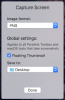
This issue still persists even after upgrading to macOS Catalina and Parallels Toolbox 3.8.1 (2969). Even after completely uninstalling Parallels Toolbox and re-installing it. I can only capture to the clipboard - not to the desktop or to any folder such as "Desktop", "Downloads", etc. I used to be able to select other locations, but since Parallels Toolbox 3.0, I can only capture to the clipboard. Maybe it only works properly if you are logged in as administrator or something like that...IDK. Following is a screenshot of trying to set the Capture Screen Preference to "Desktop"...the problem is that if I click "Done" and then go back into the Preference, then it will always be set back to "Clipboard". And, indeed, if you use the tool, the screenshot will end up on the Clipboard and not in "Desktop", etc.
Hello serge,
Yes, the folders are checked underneath "Parallels Toolbox". I don't see an entry for "Capture Screen". Also, I had this problem before upgrading to Catalina. This feature used to work, but it quit working around Nov 2018 after upgrading to Parallels Toolbox 3.0.
Yes, the folders are checked underneath "Parallels Toolbox". I don't see an entry for "Capture Screen". Also, I had this problem before upgrading to Catalina. This feature used to work, but it quit working around Nov 2018 after upgrading to Parallels Toolbox 3.0.
sergk
Parallels Developers
Could you please:
- run this command in terminal app:
defaults write com.parallels.toolbox ExtendedLogging 1
- replicate the issue
- generate and send Technical Report (https://kb.parallels.com/en/124107) and post its ID here
- run this command in terminal app:
defaults write com.parallels.toolbox ExtendedLogging 1
- replicate the issue
- generate and send Technical Report (https://kb.parallels.com/en/124107) and post its ID here
sergk
Parallels Developers
Thanks,Thanks for your reply. The Report ID is:
336602719
could you run this command in Terminal application and paste output here?
Code:
defaults read com.apple.screencapture{
"last-analytics-stamp" = "607391135.152413";
"last-messagetrace-stamp" = "606412031.912923";
"last-selection" = {
Height = "340.5";
Width = 617;
X = 923;
Y = "274.25";
};
"last-selection-display" = 0;
location = "/Users/redacted/Downloads";
"location-last" = "~/Desktop";
"show-thumbnail" = 1;
style = selection;
target = file;
video = 0;
}
Note: When I use the built-in macOS "Screenshot" tool, I am able to change the save location without issue.
"last-analytics-stamp" = "607391135.152413";
"last-messagetrace-stamp" = "606412031.912923";
"last-selection" = {
Height = "340.5";
Width = 617;
X = 923;
Y = "274.25";
};
"last-selection-display" = 0;
location = "/Users/redacted/Downloads";
"location-last" = "~/Desktop";
"show-thumbnail" = 1;
style = selection;
target = file;
video = 0;
}
Note: When I use the built-in macOS "Screenshot" tool, I am able to change the save location without issue.
sergk
Parallels Developers
Looks like Capture Screen tool has no rights to create files on your Desktop, Downloads, etc folders. Let's check Desktop folder, for example. Please run this command in Terminal app:
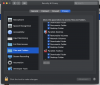
Also please check access for Desktop folder in "System Preferences -> Security & Privacy -> Privacy -> Files and Folders" for two applications: "Parallels Toolbox" and "Capture Screen". If access is not given then set appropriate checkboxes. If access is already given then uncheck it and set again (no need to restart Parallels Toolbox). And then try to capture screen into the Desktop.
(replace <user_name> with real user name)la -la /Users/<user_name>/Desktop
Also please check access for Desktop folder in "System Preferences -> Security & Privacy -> Privacy -> Files and Folders" for two applications: "Parallels Toolbox" and "Capture Screen". If access is not given then set appropriate checkboxes. If access is already given then uncheck it and set again (no need to restart Parallels Toolbox). And then try to capture screen into the Desktop.
Hi Sergk,
Thank you for your reply. I checked the settings in "Security & Privacy \ Files and Folders" and the boxes are checked (as in your screenshot above). I unchecked them and re-checked them a couple of times for good measure. Then I retested and got the same results as before.
I was not able to run the command that you specified above - when I run the command I get the following error message:
Is there something else to try?
-William
Thank you for your reply. I checked the settings in "Security & Privacy \ Files and Folders" and the boxes are checked (as in your screenshot above). I unchecked them and re-checked them a couple of times for good measure. Then I retested and got the same results as before.
I was not able to run the command that you specified above - when I run the command I get the following error message:
Code:
zsh: command not found: laIs there something else to try?
-William
sergk
Parallels Developers
Sorry, it was a mistype in command, here is correct variant:
ls -la /Users/<user_name>/Desktop
Ok, thanks.
I have Read & Write privileges on my Desktop. I can save, delete, and launch files to/from my Desktop. The built-in Apple Screenshot app can save files to my Desktop.
I think the curious thing is that the Parallels Capture tools can't maintain their own "Save to" settings. In other words, when I change the "Save to" setting to say "Desktop", and then I click "Done", the change is not saved - because if I immediately check the setting again (even though I haven't even taken a screenshot yet) the "Save to" setting has reverted back to "Clipboard". No matter what I choose for the "Save to" setting, it always immediately reverts back to "Clipboard" as soon as you click "Done". Furthermore, if I choose "Other..." in the "Save to:" dropdown list and then I pick a folder from the resulting Finder window and then I click "Select", the "Save to:" option will be instantly reverted back to "Clipboard" even before pressing "Done".
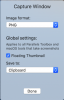
So, it doesn't appear to be so much of an issue of the Capture Tools not having access to the Desktop, Documents, or other disk areas; it appears to be that the "Save to" setting itself cannot maintain its state. Below is a screenshot of what I always see when I open the settings for any of the Screen Capture tools (regardless of what I selected for the "Save to" option on the previous attempt.)
Thanks
-William
I have Read & Write privileges on my Desktop. I can save, delete, and launch files to/from my Desktop. The built-in Apple Screenshot app can save files to my Desktop.
I think the curious thing is that the Parallels Capture tools can't maintain their own "Save to" settings. In other words, when I change the "Save to" setting to say "Desktop", and then I click "Done", the change is not saved - because if I immediately check the setting again (even though I haven't even taken a screenshot yet) the "Save to" setting has reverted back to "Clipboard". No matter what I choose for the "Save to" setting, it always immediately reverts back to "Clipboard" as soon as you click "Done". Furthermore, if I choose "Other..." in the "Save to:" dropdown list and then I pick a folder from the resulting Finder window and then I click "Select", the "Save to:" option will be instantly reverted back to "Clipboard" even before pressing "Done".
So, it doesn't appear to be so much of an issue of the Capture Tools not having access to the Desktop, Documents, or other disk areas; it appears to be that the "Save to" setting itself cannot maintain its state. Below is a screenshot of what I always see when I open the settings for any of the Screen Capture tools (regardless of what I selected for the "Save to" option on the previous attempt.)
Thanks
-William
Dear WilliamC7, This is a software bug in the latest version of toolbox. I have found a work-around. Below you will find the solution to the problem of being unable to save screenshots to your desktop. It worked for me. I hope it works for you too.
I am end user of Toolbox like you. I had the same issue. - I couldn't save Screen captures to desktop. No matter what setting I chose, it would only save a link (to my dropbox, in my case). It was exactly the same problem as you.
First of all, may I congratulate you on your very clear and succinct description of the issue. You certainly out-class the the person who is trying to help you. I didn't feel that they quite got to the bottom of the problem. Saying "It works for me", is not really an answer, and the subsequent suggestions looked like they were grasping at straws, when it is quite obvious that we are dealing with a software bug. I came here because I had exactly the same problem and it was driving me nuts.
Then I found a "workaround" solution. All you have to do is un-check the box "Floating Thumbnail" in your capture above, and Voila! Your images will save to the desktop again like in the previous versions.
By the way, I never had the very last problem you mentioned in your last post "the "Save to:" option will be instantly reverted back to "Clipboard" even before pressing "Done".". I am pretty sure you never had this problem before you started trying to fix the issue. You would have noticed it. It would be almost impossible not to notice it. In my opinion, one of the attempted "fixes" has added to your problems. If that persists, it sounds like you need to check all the fixes again to see if you accidentally unchecked a box. (Sometimes a Mac can be slow in adding a check-mark so clicking twice can add then remove it) .
I hope this works for you. Let me know!
I am end user of Toolbox like you. I had the same issue. - I couldn't save Screen captures to desktop. No matter what setting I chose, it would only save a link (to my dropbox, in my case). It was exactly the same problem as you.
First of all, may I congratulate you on your very clear and succinct description of the issue. You certainly out-class the the person who is trying to help you. I didn't feel that they quite got to the bottom of the problem. Saying "It works for me", is not really an answer, and the subsequent suggestions looked like they were grasping at straws, when it is quite obvious that we are dealing with a software bug. I came here because I had exactly the same problem and it was driving me nuts.
Then I found a "workaround" solution. All you have to do is un-check the box "Floating Thumbnail" in your capture above, and Voila! Your images will save to the desktop again like in the previous versions.
By the way, I never had the very last problem you mentioned in your last post "the "Save to:" option will be instantly reverted back to "Clipboard" even before pressing "Done".". I am pretty sure you never had this problem before you started trying to fix the issue. You would have noticed it. It would be almost impossible not to notice it. In my opinion, one of the attempted "fixes" has added to your problems. If that persists, it sounds like you need to check all the fixes again to see if you accidentally unchecked a box. (Sometimes a Mac can be slow in adding a check-mark so clicking twice can add then remove it) .
I hope this works for you. Let me know!
Hi CliveT1,
Thanks so much for trying to help out. I tried your suggestion, but unfortunately it did not work for me - I still have the same issue as before, so I guess I'm affected by a different bug. Hopefully, some other folks will benefit from your contribution to this thread though.
Take care and have a great week!
Thanks so much for trying to help out. I tried your suggestion, but unfortunately it did not work for me - I still have the same issue as before, so I guess I'm affected by a different bug. Hopefully, some other folks will benefit from your contribution to this thread though.
Take care and have a great week!
Hi CliveT1,
Yes, I'm logged into iCloud. Unfortunately, I don't see any settings for iCloud in the Security and Privacy settings area. I've also tried to change the settings to save to Documents, Downloads, etc. and it still always reverts back to Clipboard. IDK - I guess I'm just (un)lucky.
Yes, I'm logged into iCloud. Unfortunately, I don't see any settings for iCloud in the Security and Privacy settings area. I've also tried to change the settings to save to Documents, Downloads, etc. and it still always reverts back to Clipboard. IDK - I guess I'm just (un)lucky.