Install the app
How to install the app on iOS
Follow along with the video below to see how to install our site as a web app on your home screen.
Note: This feature may not be available in some browsers.
You are using an out of date browser. It may not display this or other websites correctly.
You should upgrade or use an alternative browser.
You should upgrade or use an alternative browser.
Can't install Parallels Tools on Windows 10 TP
- Thread starter BeebarbX
- Start date
AndreasM_FFM
Bit poster
Hi,
i run yosemite 10.10.3 on Paralles Version 10.2.1 (29006), Windows 10 (10074)
PT does not install. I did the following:
1. Click start
2. Type "run"
3. Type %temp% click OK.
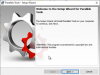
4. Locate PrlToolsPackages Double click to open it.
5. Right click on "set up" - click run as administrator.
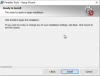
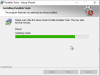
6. Click next to install parallels Tools continue with the installation and check there is any error message. provide us a screenshot of the error,
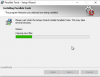
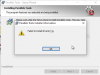
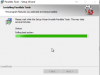
then the Installation came up with a message: Failed to install driverprl_tg
I don´t knw to me this could be a rights issue with a folder?
Any suggestion appreciated
i run yosemite 10.10.3 on Paralles Version 10.2.1 (29006), Windows 10 (10074)
PT does not install. I did the following:
1. Click start
2. Type "run"
3. Type %temp% click OK.
4. Locate PrlToolsPackages Double click to open it.
5. Right click on "set up" - click run as administrator.
6. Click next to install parallels Tools continue with the installation and check there is any error message. provide us a screenshot of the error,
then the Installation came up with a message: Failed to install driverprl_tg
I don´t knw to me this could be a rights issue with a folder?
Any suggestion appreciated
Last edited:

Maria@Parallels
Problem solver
@AndreasM_FFM please try following:
1. Start your Windows virtual machine -> click on Start and type in the "Search" box "cmd" -> on the top of the list please right click on the "Command prompt" and choose run as administrator
2. In the Command prompt window please type the following command:
sfc /scannow and hit Enter.
3. Restart your Virtual machine and reintsall Parallels Tools.
1. Start your Windows virtual machine -> click on Start and type in the "Search" box "cmd" -> on the top of the list please right click on the "Command prompt" and choose run as administrator
2. In the Command prompt window please type the following command:
sfc /scannow and hit Enter.
3. Restart your Virtual machine and reintsall Parallels Tools.
AndreasM_FFM
Bit poster
Hi,
thanx a lot for the fast answer. Unfortunately this does not help. After the scan (as admin) and reboot, same problem the PT install stops after 55% with the same error.
thanx a lot for the fast answer. Unfortunately this does not help. After the scan (as admin) and reboot, same problem the PT install stops after 55% with the same error.
Maria@Parallels
Problem solver
@AndreasM_FFM, could you create a Problem Report for the virtual machine as described here http://kb.parallels.com/en/9058 and provide us with the Problem Report ID please.

Maria@Parallels
Problem solver
Dominic_Richardson
Bit poster
Same issue, latest parallels and win 10 guest OS.

Hi Dominic_Richardson, please install Parallels Tools with administrator privileges, if you still having the issue, please create a Problem Report for the virtual machine as described here and provide us with the Problem Report ID.Same issue, latest parallels and win 10 guest OS.
I'm having the same problem here, Windows 10 Anniversay Edition, 32-bits. Manual installaltion reports Plug & Play service unavailable, even if it's reported to be running on Services console.Maybe I wasn't clear, but being 32 or 64 bit makes a difference. As of right now, PT do not install on Windows 10TP 32 bits.
However, on Windows 10TP 64 bits that problem doesn't exist, and a workaround like changing the OS Type (NOT THE NAME) seems to get around it.
Attachments
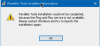
Hi, please check out the following steps to fixed the issue:I'm having the same problem here, Windows 10 Anniversay Edition, 32-bits. Manual installaltion reports Plug & Play service unavailable, even if it's reported to be running on Services console.
1. Connect USB device to virtual machine and create problem report (Actions > Send Technical Data) and save the ID.
2. Shut down your virtual machine.
3. Unplug all possible USB devices from host.
4. Turn off shared camera, shared Bluetooth, shared printers:
- Open virtual machine settings ( http://kb.parallels.com/117287 ) > Hardware > USB & Bluetooth > Be sure that Automatic sharing of Web cameras and Bluetooth devices is unchecked.
5. Go to the Boot Order tab > Boot Flags and type the following flags:
devices.usb.keyboard=0; devices.usb.mouse=0
6. Start the virtual machine to reinstall Parallels Tools and check how it works.
I am very upset about Parallels right now. I've been using the virtual machine with Windows 10 for a while now, and it's always worked well so far. Since 2 weeks no longer. After calling the virtual machine after the last update, the installation of Parallels Tools started. This could not be completed. It was only displayed that due to a problem the installation could not be completed and the virtual machine should be restarted. After that the same game. Since then I have now spent oodles of hours trying to fix the problem. I have read all the support posts on the subject and followed the advice. Nothing has worked. Even with the manual installation it did not lead to success. The installation routine started until the error "Failed to install driverprl_tg" was displayed. After that a rollback occurred and that was it. Also trying to restore the virtual machine from a backup resulted in the same problem.
I don't know what to do anymore. I can't use Parallels like this. Does anyone have any tips?
I don't know what to do anymore. I can't use Parallels like this. Does anyone have any tips?
Maria@Parallels
Problem solver
Hi, please check this KB articleI am very upset about Parallels right now. I've been using the virtual machine with Windows 10 for a while now, and it's always worked well so far. Since 2 weeks no longer. After calling the virtual machine after the last update, the installation of Parallels Tools started. This could not be completed. It was only displayed that due to a problem the installation could not be completed and the virtual machine should be restarted. After that the same game. Since then I have now spent oodles of hours trying to fix the problem. I have read all the support posts on the subject and followed the advice. Nothing has worked. Even with the manual installation it did not lead to success. The installation routine started until the error "Failed to install driverprl_tg" was displayed. After that a rollback occurred and that was it. Also trying to restore the virtual machine from a backup resulted in the same problem.
I don't know what to do anymore. I can't use Parallels like this. Does anyone have any tips?
Hello Maria,
I have now tried everything described in this KB article. That all worked, but not the installation of Parallels Tools, that still does not work. I have now wasted a bunch of time again and it still doesn't work. I am really annoyed. What can I do now?
I also have to say that I never had this problem before. It's only been occurring since the last Parallels update, in my opinion. I have a second computer on which I have not installed the update. It still runs flawlessly. But what to do now, if all described measures do not help?
Many greetings
Gerhard
I have now tried everything described in this KB article. That all worked, but not the installation of Parallels Tools, that still does not work. I have now wasted a bunch of time again and it still doesn't work. I am really annoyed. What can I do now?
I also have to say that I never had this problem before. It's only been occurring since the last Parallels update, in my opinion. I have a second computer on which I have not installed the update. It still runs flawlessly. But what to do now, if all described measures do not help?
Many greetings
Gerhard
Maria@Parallels
Problem solver
Thank you for your reply and provided information.Hello Maria,
I have now tried everything described in this KB article. That all worked, but not the installation of Parallels Tools, that still does not work. I have now wasted a bunch of time again and it still doesn't work. I am really annoyed. What can I do now?
I also have to say that I never had this problem before. It's only been occurring since the last Parallels update, in my opinion. I have a second computer on which I have not installed the update. It still runs flawlessly. But what to do now, if all described measures do not help?
Many greetings
Gerhard
Did you get any specific error message during the Parallels Tools installation?