I'm attempting to set up a Mac guest, running Catalina on the host and Parallels Desktop 15. I've been able to get a working VM with El Capitan running, but I can't find a way to set or control the disk size.
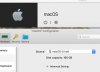
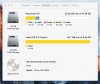
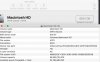
I've got nearly 200 GB actually available on my hard disk. I tried setting the Expanding Disk 128 GB. When I ran Migration Assistant, but I got a message that my space was -20 GB short, so the migration couldn't take place. I set the Expanding Disk to 168 GB and got the identical result. It was still -20GB short; and again at 180 GB. On the virtual machine, About This Mac > Storage, always shows 67.49 GB of disk space although a large amount of Flash Storage is shown as available.
I unchecked Expanding Disk and set the disk space to 160GB. The progress bar showed it get set up and Parallels was shown as using a huge percentage of my hard disk. The virtual machine still shows 67.49 GB.
I'm back to trying the Expanding option.
FWIW, whenever I adjust the disk space, I do have the virtual machine shut down.
How do I get it to actually allow me to use more than the 67.49 GB?
I've got nearly 200 GB actually available on my hard disk. I tried setting the Expanding Disk 128 GB. When I ran Migration Assistant, but I got a message that my space was -20 GB short, so the migration couldn't take place. I set the Expanding Disk to 168 GB and got the identical result. It was still -20GB short; and again at 180 GB. On the virtual machine, About This Mac > Storage, always shows 67.49 GB of disk space although a large amount of Flash Storage is shown as available.
I unchecked Expanding Disk and set the disk space to 160GB. The progress bar showed it get set up and Parallels was shown as using a huge percentage of my hard disk. The virtual machine still shows 67.49 GB.
I'm back to trying the Expanding option.
FWIW, whenever I adjust the disk space, I do have the virtual machine shut down.
How do I get it to actually allow me to use more than the 67.49 GB?